Select a category

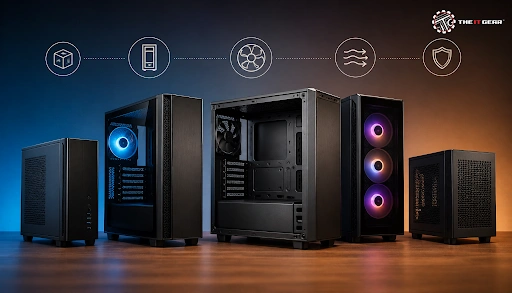
The PC case, one of the most ignored parts of a PC with its CPU speeds and GPU power, is arguably the most critical part of the whole desktop PC. Besides being important for protecting your expensive components and the overall cooling, it makes the whole experience much more satisfying. First-time PC builders in India should get their heads around this, too.
At its core, a computer case is the enclosure that houses and protects the critical hardware of a personal computer. The very basic definition and function of a computer case, also called an enclosure, is the physical shell that encloses and gives protection to the essential hardware components of a personal computer.
The computer case definition and function is four-fold, which includes supporting all the components present, protecting the components, ensuring air circulation, and providing a structured system for the components. For example, like any other hardware component, the PC case should not only support the components but also should block the surface dust and take measures against shocks.
The Core Functions: Protection, Structure, and Cooling
The three pillars of a case are what make it contributing to being a computer case:
The case is the one part that every single one of your other parts is mounted to or inside. The case does so much more than keep your PC together.
A computer case is also referred to as a computer chassis, tower, cabinet, system unit, or even a housing. The name chassis refers more exactly to the inside of the case (the frame) and tower describes the shape of the case (the vertical shape that has become the norm for desktop PCs).
Looking at the types of computer cases, these can be broken down by sizes & shape, commonly known as the form factor. The most common types are:
To truly understand a case, you need to know its components. While a computer case diagram is helpful, understanding the computer case parts and functions is key. Each part has a specific purpose that contributes to the overall system.
Choosing the right computer case sizes is essential because it affects what parts you can house within. The most fundamental rule is that the case needs to be compatible with the form factor of your motherboard. An ATX motherboard cannot be installed in a Mini-ITX case and vice versa. Here is a simple compatibility guide:
Check the case's spec sheet before buying to confirm that it will support the GPUs, CPU coolers, and radiators that you want to install (length, height, etc.)—a very typical computer case feature to research.
This is what a lot of people get confused about. A case doesn't directly affect your CPU and GPU. It's the indirect effects that it has that make the difference. A non-airflow case will make the components run hotter. More heat means more thermal throttling. This is when a CPU or GPU slows itself down to prevent overheating and extends your PC's performance.
Corsair states that "...a larger case can often be a better choice as there's more fan mounts, room to move air around and room enough for large radiators." A cheap case with a solid obstructed front panel starves your components of air which leads to higher temps and more noise.
PC cases offer many benefits that impact the functionality, performance, and longevity of your computer. By providing an organized enclosure, protecting internal components, facilitating cooling, and supporting proper airflow, they are essential for ensuring optimal operation of your PC.
A natural progression from that question would be: can you run a PC without the case? The answer is: yes, and while not advised for anything but short-term use. You can check out the components like this by 'breadboarding' them—that is, literally putting the motherboard on top of its cardboard box and connecting everything up. This is a very common method for testing.
Yet operating a PC without a case presents a host of problems: dust, static liquid damage, physical damage and inadequate support for essential heavy components such as graphics cards.
A good quality computer case lasts a very long time. Due to incredibly standardized form factor specifications (the ATX was introduced by Intel in 1995), a good case can survive many internal hardware upgrades. For more on timing upgrades, see this PC upgrade guide.
In fact, in the lifetime of a good case, you might replace three or four CPUs and graphics cards. The case is fundamentally sound for a long period of time. The only parts to fail are the fans (bearings will do 3-7 years before they wear out), front panel USB ports and switches, and the paintwork or plastic clips.
When it comes to how to choose a PC case, beyond the appearance, you should consider these basic factors:
1. Motherboard Compatibility: This is the first filter. Ensure the case supports your board's form factor (ATX, mATX, etc.). See this motherboard specifications guide if you need help.
2. Airflow Design: You want a case with a mesh front rather than a solid glass or metal front. This gives free airflow into your case. Look for a high number of fan mounts.
3. Component Clearance: Fitting GPU length, CPU cooler height, and radiator support. Graphics cards are getting bigger and bigger so this is really important. Find a computer case diagram of the case you are thinking of and visualize.
4. Build Quality and Features: Check if the case has dust filters, cable grommets, a PSU shroud, and tool-less panels. These features greatly facilitate the process of building and maintaining your computer.
5. Aesthetics: Pick a case you like the look of. It will be sitting on your desk for years, so style and substance should be one.
If you're a builder in India then companies like The IT Gear provide a selection of all the different accessories, which can be used as supplies. When it comes to a case it is a good investment, because it is the best protection for all of your components.

Choosing the right computer case is a crucial step in your PC building journey. It is the foundation upon which your entire system is built, influencing everything from thermal performance to the ease of future upgrades. While it may not be the flashiest component, the right chassis provides the protection and environment your expensive hardware needs to thrive.
For Indian builders looking for a reliable place to start, The IT Gear provides a wide range of PC cases to suit every budget and build style, helping you turn your list of components into a complete, powerful machine.
Q: What is the difference between a tower case and a desktop case?
A: A tower case is designed to stand vertically, which saves desk space and often provides better airflow. A desktop case is a horizontal enclosure, designed to sit flat on a desk with the monitor placed on top. Towers are the modern standard.
Q: What does "case stand for in computer"?
A: It is not an acronym. "Case" is the standard English word for the housing or enclosure.
Q: What is the most common type of computer case?
A: The Mid Tower is the most popular form factor. It offers the best balance of size, component compatibility, cooling capability, and price for the majority of builders.





#No. 9, 5th Floor, Max City Center, T. P Lane, Sadar Patrappa Road, Bengaluru - 560002 (Karnataka)






Looks like you haven't added anything yet. Explore our builds, components and gear.
Continue shopping