









Select a category

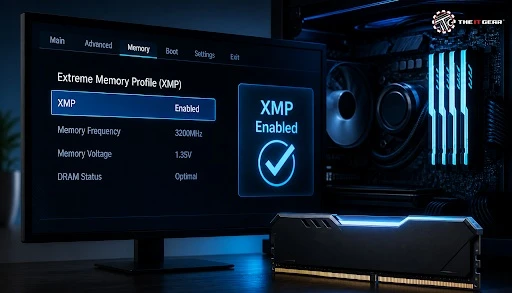
Most DDR4-3200 kits will actually post at 2133MHz and most DDR5-6000 kits will POST at 4800MHz because JEDEC defaults prioritise stability over extreme performance. Turning on XMP or EXPO loads the memory manufacturer's profile, and can regain 15–20 per cent of memory bandwidth in 30 seconds. Here is how to do it safely for gaming and productivity PCs.
It's a short journey to get your PC to post cleanly, but tiny details make it happen. That's where the memory profile comes in. It's one switch in new UEFI BIOS, but older boards may require searching through an OC or Tweaker tab.
1. Savior UEFI BIOS. Reboot and press F2 or Del at POST – Fast Boot can be turned off if you miss the key.
2. Select Profile 1. Locate XMP, EXPO, or DOCP in EZ Mode or the OC/Tweaker tab. Select the rated profile and not a manual frequency.
3. Save and exit. Hit F10 then allow memory training to complete; first boot may take a minute or more.
4. Confirm. The frequency when the workload is running can be checked in the Task Manager > Performance > Memory, CPU-Z Memory tab, or HWiNFO.
Now this is the direct answer to how to enable XMP, the rest just explains why it works and what to do if it does not.
XMP – eXtended Memory Profile, an extension of the SD protocol by Intel that contains a tested profile of the RAM at the highest possible speed. AMD's DDR5 equivalent is EXPO and many ASUS AM4 boards use this as DOCP. If you're not using this profile, your board will default to DDR4 at 2133/2400/2666MHz and DDR5 at 4800/5600MHz.
An XMP profile contains the speed, main timings (CL-tRCD-tRP-tRAS), and DRAM voltage (generally 1.35V with DDR4 and 1.35–1.40V with DDR5). XMP 3.0 supports up to three profiles and user-defined slots; EXPO supports up to the same with Ryzen. Use the entire profile, not just the MHz.
Whether to turn the BIOS XMP on or off is a matter of your aim. Turn on for gaming, rendering, memory-intensive workloads that require bandwidth and latency. Leave off for debugging, NAS/server stability, thermally limited small-form-factor builds or an unstable memory controller.
1. Turn on for performance. More tighter timings and higher frequency better frame-time consistency and 1% lows in CPU bound titles.
2. Test all hardware by reloading the JEDEC defaults before testing hardware if you are experiencing BSODs, boot loops or random restarts.
3. QVL checking. Motherboard QVL and matched 2-DIMM kit and motherboard helps to eliminate training failures.

Yep, but in this case, it's required: it's just running the RAM at its certified speed, instead of the just-about-useless JEDEC speed. A DDR4-3600 kit runs from 2133 to 3600 MT/s, increasing bandwidth and reducing latency.
The improvements are noticeable in compression and rendering, and most CPU-limited games. 4K GPU-limited games may not budge. It's actually an overclock of the CPU's memory controller, not of the module.
Select the profile type for your CPU platform (Intel – read XMP, AMD 5th Gen / AM5- read EXPO and old ASUS AM4 boards – DOCP). Compatibility among brands can vary so if you can stick with the same CPU makes RAM tuning easier! (buy a matched 2-DIMM kit, install in A2/B2, check the QVL). On Ryzen, the memory controller is tuned around EXPO and the Infinity Fabric.
This is the AM5 sweet spot, and there's only one way to get there – the one-click way of doing it but now without the wiggle room. Don't buy four DIMMs, buy 2×16 GB or 2×32 GB kits because DDR5-6000 4-DIMM typically won't train.
Upgrade to the latest BIOS/AGESA, leave SOC/VDDIO/VDDCR on auto, get ready for lengthy first-boot training. If that fails, hit down to 5600 with XMP timings. And don't forget, 6000 MHz = 6000 MT/sec!
The menu names may be different but the setting is the same memory profile toggle.
On LGA1700/LGA1851 motherboards, access the BIOS, open EZ Mode or OC/Tweaker, choose XMP Profile 1, save changes with F10, and confirm the setting. Z790 and Z890 boards typically support XMP 3.0 profiles.
On AM5 platforms, enable EXPO Profile 1 in the BIOS; on AM4 platforms, look for DOCP or A-XMP settings. Initially, keep the SoC voltage set to Auto, then test for stability.
If POST fails, use EZ Mode's XMP/EXPO switch or Ai Tweaker > Ai Overclock Tuner > XMP I, XMP II, or DOCP. Clear CMOS.
Open Tweaker > Extreme Memory Profile (X.M.P.) select Profile 1 and save. On DDR5 boards, may be DDR5 XMP Booster, use Q-Flash for BIOS updates.
Most HP prebuilts lock or hide memory overclocking. If there is no Memory or Advanced tab, then you are unable to use XMP on that OEM board.
enabling XMP is one of the most risk-free upgrades to make a PC faster as long as you stick with validated profiles and test stability. The IT Gear can assist you in selecting DDR4/DDR5 memory and a motherboard that supports it for your build, and advise you on the basics of BIOS before buying. Don't forget to check QVL support and have a CMOS clear plan.
How do I enable XMP for my RAM?
Enter BIOS using Del/F2, choose XMP/EXPO Profile 1, save and exit using F10 and confirm in Task Manager or CPU-Z. If it doesn't work, clear CMOS and update BIOS.
Is XMP overclocking?
This is a verified factory profile although it does overclock the CPU memory controller. The RAM module is running at its rated spec.
What if my PC will not boot after enabling XMP?
Clear CMOS boot to JEDEC default update BIOS Re-install RAM in A2/B2 then try the next-lower profile. For DDR5 boards you may also need Memory Context Restore enabled.





#No. 9, 5th Floor, Max City Center, T. P Lane, Sadar Patrappa Road, Bengaluru - 560002 (Karnataka)






Looks like you haven't added anything yet. Explore our builds, components and gear.
Continue shopping