












Select a category

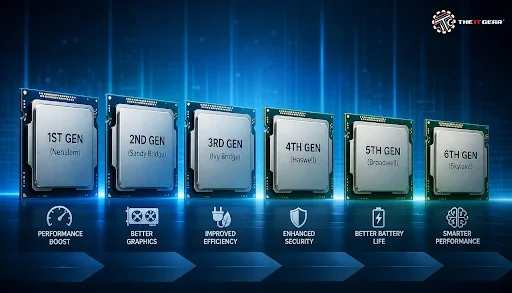
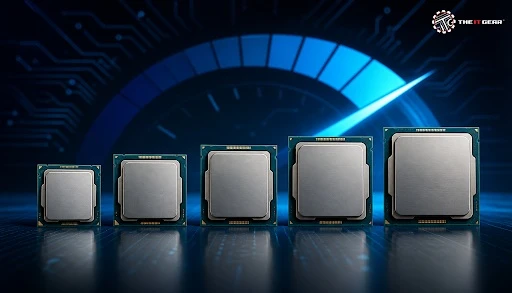
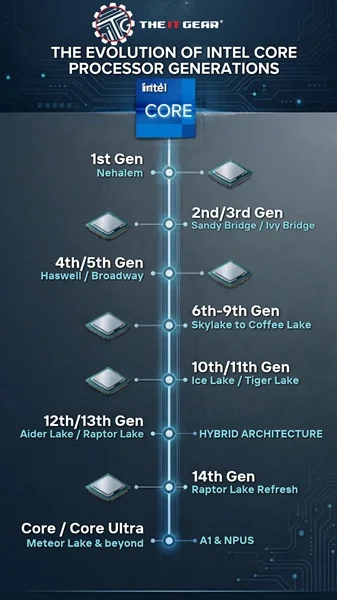
Intel has released over fourteen generations of Core processors since the first Core i-series chips showed up, and there is still no substitute for the model number on the box. A 12th-gen i5 and 4th-gen i7 can be almost indistinguishable when perusing a spec sheet, but the chips can be very different under the hood. Here's how to decipher Intel Core processor generations, the codenames related to them, and what led to the end of the "I".
Each of these Intel Core family generations corresponds to a microarchitecture code-name and launch date and that mapping gives you everything you need to know if a chip is market-current, on the way out, or already over the hill.
The initial generation Core I family launched with Nehalem and Westmere back around 2008-2010, and here we trace the mainstream desktop and mobile up to the 14th.
Starting from 2023, Intel moved away from the numbered generations to the Core Ultra Series 1, Series 2 etc for their expensive range. This explains why now you will see both systems available at the same time in shops.
Any Intel processor's name can be decoded in the same order. That's why a repeatable setup wins over memorising SKUs.
Use an example such as i5-10400F and detail each of the below five steps.
1. Family of brands. The first word reveals the family: Intel Core, Intel Core Ultra, or the budget Celeron, Pentium Gold and Xeon workstation brands. It gives you, which market segment the processor belongs to even before you check the digits.
2. Tier. Then you'll see the CPU model, usually i3, i5, i7, or i9 (or Ultra 5, 7 and 9 on newer chips). The number after the I (5, 7 or 9) indicates placement within a generation, not across generations.
3. Generation digits. These two digits after the dash are the generation, and this is the most important part of the name. Beginning with the 10th gen, the first two digits number (i5-10400 is 10th gen), older chips only show one digit (i5-6600 is 6th gen).
4. SKU number. The rest of the numbers stand for the different chip classifications within a tier. A higher SKU number would typically denote more cores, cache, or higher clocks within the same generation and tier.
5. Suffix letter. K means unlocked and overclockable, F has no graphics, H, and HX are high-powered mobile, U is low-powered mobile, T is low-powered desktop, and G is for discrete-class graphics. The suffix is oftentimes the more significant aspect for laptop shoppers than the tier.
Knowing Intel processor generations like this means you can compare any two of them in a matter of seconds. It keeps the rest of this guide real and useful rather than too theoretical.
Each rung of the four Core levels is a platform that scales for price and performance, so Intel carefully positions them, not arbitrarily. Here's what each step actually gives in 2026-era purchase terms.
1. Core i3. This is the bottom end for browsing, writing, video chatting and general light-duty multitasking. As its cores are few and it never has additional room to overclock, it's an obvious choice for a second PC in the household.
2. Core i5. This is the standard sweet spot that most Indian consumers should default to. It's got a good balance of core count, clock speed and price for gaming, college work, and photo editing without paying for a premium.
3. Core i7. This performance level features additional cores, cache, and support for Hyper-Threading in all but the newest generations. It's best for content creators, developers with virtual machines, and power users who multitask heavily.
4. Core i9. This is the maximum core and clock SKU in each generation of our consumer lineup. It is targeted at enthusiasts, 4K video editors and users who really benefit from solid multi-core work.
Keep in mind the release generation and tier are separate dimensions, so you can have a new i3 running rings around a 8-year old i7.
Gone is the number that refers to the newest Intel processor generation, and it is the main source of confusion for customers.
Intel launched Core Ultra with Meteor Lake (Series 1) in 2023, before Series 2 – Arrow Lake desktop and Lunar Lake thin laptop chips – were launched in 2024 and Series 3 silicon was announced after.
The chips bring an NPU for on-device AI work, more powerful integrated graphics and greater efficiency, but they also change the socket and memory requirements. Since Intel refreshes the line-up quite often, double-check the current flagship and its platform specifications on the official product page at Intel rather than go by a review from some time ago.
There's a whole other naming era that is not a quality indication: Core 7 and i7 have different generations in their names, so don't be fooled by the label. Core i7 has been the older naming tradition up to 14th gen; "Core 7" today is Core Ultra 7 and newer.
Real talk is that one newer Core Ultra 7 will typically outperform an older Core i7 at the same tier, but that's not a one-to-one comparison for tiers. Always check the generation and the core counts, not the badge.
Not all Intel chips are good deals now, not because they are defective but because the environment in which they exist has become worn out. Keep an eye out for these four signs.
1. very old gens on dead sockets. Anything below 8th gen was an older DDR3 or even very early DDR4 board, no support for Windows 11, and no upgrade potential. The compromises just don't make up for the savings.
2. No video output? F-suffix chips do not have GPUs. If you pick an F-series processor (with no suffix) you will not get a video output if your build is otherwise devoid of a discrete GPU.
3. Low-power U-series laptops sold as performance devices. Designed for battery life and cramming with creative work causes throttling and buyer's regret.
4. Cheap i9 or i7 laptops with poor cooling. When a flagship processor in a thin chassis relies on a single heat pipe, it will never hit its boost clocks, meaning you have paid flagship price for mid-tier performance.
At The IT Gear, listings specify generation, socket, and graphics configuration so you can check all the boxes before you buy.
1. First, find the generation digits in the model number.
2. Ensure that the socket or laptop platform is compliant with your board or upgrade plan.
3. See if the suffix is F, K, H, U, or T. And what does it mean for you?
4. Match the tier to your real workload rather than the price tag.
5. Check the integrated graphics and the amount of cooling needed before ordering.
A glimpse at the number below the Intel Core logo quickly leads to a shortcut for gauging capability, and that means a means for buying smarter and that means avoiding money regret and disappointment.
An up-to-date i5 with the correct suffix will generally do the trick over a sale-priced previous generation i7 on a defunct platform. Find all our current generation Intel processors and generation and socket info for laptops on the product details page.
Do Intel processor generations matter for everyday use?
Yes, but less so than a tier does. For browsing and office tasks, a two-generation-old i5 is almost indistinguishable from a fresh one: the differences are in battery life, graphics, and AI.
How do I check which generation my laptop's CPU is?
Open Task Manager, on the Performance tab take a look at the processor identifier. The numbers after the dash are the number of the CPU precisely because it is decoded in the steps above.
Is a newer i5 better than an older i7?
Most of the time, yes. A 12th-gen i5 will outperform a 7th-gen i7 as far as single core-boost performance and efficiency goes, because the architectural upgrades are significant even if the chip is a 5 generation newer model.
Will an older Intel CPU run Windows 11?
Support begins at 8th Gen Core processors. Older than that, it might technically install but you won't be getting supported updates — a real risk for work computers.





#No. 9, 5th Floor, Max City Center, T. P Lane, Sadar Patrappa Road, Bengaluru - 560002 (Karnataka)






Looks like you haven't added anything yet. Explore our builds, components and gear.
Continue shopping