Select a category

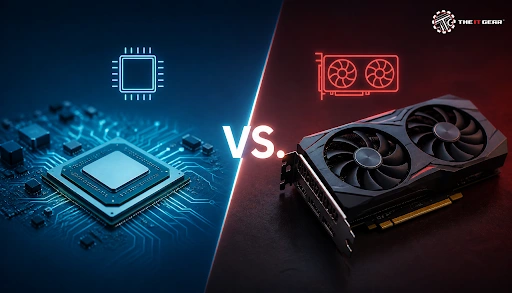
Imagine the difference in price between two laptops with the same processor sitting in an Indian showroom; it could very well be the graphics hardware that explains this. It is worth pointing out that the "dedicated always wins" rule is outdated, as nowadays integrated graphics from AMD and Intel can even outperform older, entry-level, dedicated cards.
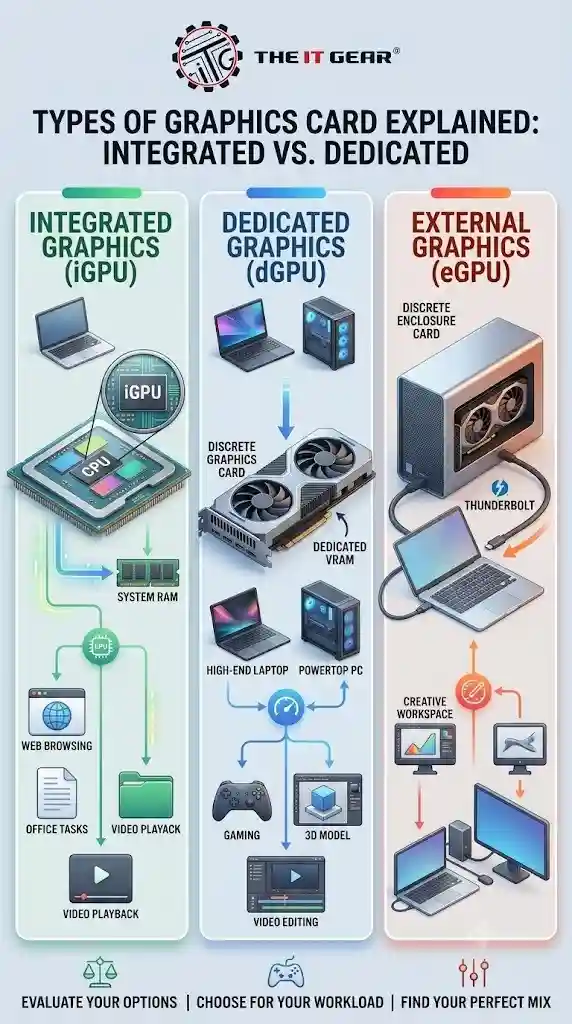
Buying a laptop with a GPU has become a bit more complicated now that graphics hardware actually breaks down into three categories. Understanding them will help you evaluate your options. If your computer has a certain card, it will dictate what sorts of applications and games you may be able to run with it, whether it can be upgraded, and most probably the price that you can expect to pay for it.
Integrated Graphics Card (iGPU)
An integrated graphics card is actually a part of the processor and is embedded on the motherboard chipsets on older setups. As this is built into the device, there is no way to pull it out and replace it. The one drawback of using an integrated graphics unit is that it lacks its own dedicated memory, which is normally provided with dedicated graphics cards, the reason why such graphics cards rely on the system's RAM.
That's why Windows Task Manager displays integrated graphics memory as "shared memory," which in reality refers to the system RAM that has been allocated to the integrated graphics unit. Integrated graphics can be found in the Intel UHD & Intel Iris family and also as AMD Radeon Graphics on Ryzen processors.
Dedicated (Discrete) Graphics Card
A dedicated graphics card is simply an independent unit comprising a GPU and its own video memory, usually referred to as VRAM, which it does not share at all with the rest of the system. On desktop machines, it is plugged into a PCIe x16 socket and can be swapped anytime, whereas the only option with laptops is an internal one which is fixed soldered and non-detachable. Examples of such cards are NVIDIA GeForce, AMD Radeon RX, and Intel Arc.
External Graphics (eGPU)
An external GPU is one that you install at home in a desktop-style enclosure with your notebook connected via Thunderbolt or USB4. With this combination, even a small laptop can take advantage of great graphics when you are working at home from the desk where your notebook is connected.
It is, of course, a less popular option because one of the most important components for eGPUs is the enclosure, which is rather expensive. And, you may not be able to get the performance that a desktop card would be capable of from a card in a box, but for most modern and thin laptops, it will be the only way to be able to upgrade hardware and install a dedicated card.
Professional workstation and data-centre accelerators sometimes get included as a fourth tier, but they operate along the same lines as dedicated cards. Combined with professional ones, there are four types at most that one might expect to find in the hardware industry of India while purchasing a new computer.
This question is the base of the whole comparison, and the differences are more or less technical rather than cosmetic. The table given below contains those factors that an Indian buyer will actually face at the time of buying and afterward.
The difference is quite straightforward — integrated graphics are less powerful compared to dedicated graphics and are suitable for devices with limited resources. While dedicated graphics come with a higher price, heat, and reduced battery life due to higher performance, they are usually more desirable to those who require powerful computing capabilities.
Which Graphics Card Is Better, Dedicated or Integrated?
Articles that declare one of them to be better only add salt to injury and simplify things. The fair answer depends on the usage, size, and cost of the device, and the following statements can explain the situations for most Indian customers.
For Students and Everyday Users
Students and regular users who are mostly going to use their computers for browsing, word processing, video chatting, and watching movies on streaming platforms should stick to integrated graphics if they want value for their money. High-resolution video decoding is not an issue, and a notebook will remain a light, quiet, and affordable gadget. A situation where one has to pay extra for a dedicated graphics card rarely leads to any noticeable change.
For Gamers
A discrete graphics unit is essential if someone is looking for a high-quality gaming experience, e.g., high-end graphics rendering in detail and high resolution. Competitive multiplayer game genres such as Valorant and CS2 are perfectly playable on modern integrated graphics, but a heavyweight game is going to definitely require a dedicated graphics card. Remember to check the power supply and clearance inside the cabinet before upgrading your desktop.
For Creators and 3D Artists
Anyone working on video editing, using Blender or CAD software should consider buying an advanced graphics card rather than an accessory. The quality of the work will depend upon the GPU and the amount of memory available in your machine. When you render, preview, and export videos, GPU and VRAM determine the speed of the workflow. Integrated graphics will be a major bottleneck for your deadline. Because you cannot add an extra amount of VRAM if needed, purchase the best possible graphics card within your budget.
Can GTA 5 Run on Integrated Graphics?
Yes, GTA 5 runs on modern integrated graphics if you accept compromises. Dropping to 720p, using Normal or Low presets, and disabling MSAA makes gameplay on chips like Intel Iris Xe and Radeon 780M-class graphics playable. Dual-channel RAM helps noticeably because the GPU shares system memory, though any dedicated card still delivers higher, steadier frames.
It's your usage scenario, not the package, that should be the deciding factor for you.
What Is a High Performance Graphics Card?
A high-performance graphics card is a discrete GPU engineered for sustained heavy loads instead of casual use. These cards carry larger VRAM buffers, more compute units, and dedicated hardware for ray tracing and upscaling technologies like DLSS and FSR. They also demand capable power supplies and proper airflow, so they are rarely a straightforward upgrade for an aging office PC.
Graphics Card Names You Should Know
NVIDIA GeForce RTX and GTX, AMD Radeon RX, and Intel Arc are the labels you will scroll past most often, while Intel Iris Xe, AMD Radeon Graphics, and Radeon 780M appear on integrated chips. Laptop versions of a card are slower than their desktop twins even when the model number looks identical. Confirm the exact variant before comparing prices.
Top Graphics Cards for Different Needs
When choosing a card, it's much more useful to match it to your requirements than to go for the one that says "largest number", as is the case in many ads. Entry-level cards are suitable for 1080p gaming for the most casual gamers, mid-range ones will do pretty well for AAA titles and editing, and flagship cards target 1440p and 4K work.
In fact, The IT Gear helps in a similar sense — its webshop lists graphics cards, processors, power supplies, and other essential components from the big manufacturers. This way, comparing specs and prices will only take a few clicks.





#No. 9, 5th Floor, Max City Center, T. P Lane, Sadar Patrappa Road, Bengaluru - 560002 (Karnataka)