











Select a category

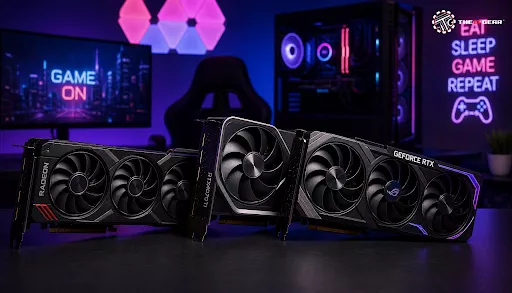
Purchasing the proper GPU for gaming is the biggest factor in building a computer. It will directly impact the level of detail in graphics, the smoothness of frame rates, and how much you enjoy games overall. Since the Indian market is flooded with various options from NVIDIA, AMD, Intel etc., it can be quite confusing for newcomers. This tutorial explains the essential elements like main specs and offers you budget-friendly options at the same time, helping you pick higher-end units that won't leave your wallet empty.
Almost every gamer's question is: "What factors contribute to a better gaming GPU?" The truth is, there is not one perfect number. What matters is the card's performance in the actual games you want to play running at your desired resolution.
A graphics card is, first of all, a device made to create pictures most rapidly. The most common performance indicator is FPS or frames per second. To enjoy story-driven games well, one should have at least 60 FPS. Games like Valorant or Apex Legends can reach even 100 FPS and beyond for extra competitiveness.
The aspects which impact the performances mostly are the processor frequency, the core design, and capabilities like ray tracing. Because of this, the top GPU for gaming is the one which fulfills performance goals while keeping the expenses reasonable.
Getting familiar with tech specs will help you purchase the right GPU for gaming.
VRAM (Video RAM) Capacity
VRAM is the memory your GPU uses to save texture, shader, and frame data. In gaming nowadays, 8GB is the absolute minimum for 1080p, but 12GB or 16GB is what you want if you play at 1440p or want to future-proof your rig. Games which are using high-res texture packs may easily require 10GB or more and that is why going for a card with a decent amount of VRAM like the 16GB available on some AMD models is a smart move for the long run.
Core Clock Speed and Architecture
Core clock speed (MHz or GHz) sets how many operations GPU cores can do in a second. Still, the architecture (e.g., NVIDIA Ada Lovelace or AMD RDNA 3) matters just as well. The latest architectures come with power-saving features and more capabilities. So, newer architecture with slightly less clock speed can beat an older higher-clocked one. So, check out only really generation-equal lineups for fairness in performance reviews.
Memory Bandwidth and Bus Width
Memory bandwidth impacts how fast the GPU will be able to write or load data to and from the VRAM. It comes from taking memory speed and multiplying by the bus width. The big advantage of a wide bus (e.g., 256-bit vs 128-bit) is the ability to convey more pixels simultaneously leading to the high image resolution and an even higher level of detailing of textures. This is why ultra-high-end cards come with really wider memory buses.

Ensuring compatibility is a must. One cannot simply randomly buy a card. Your first step is checking what type of PCIe slot you have on your motherboard. Contemporary GPUs are using PCIe x16 slots which are backwards and forwards compatible. You can put a PCIe 4.0 GPU in a PCIe 3.0 slot but you might get a small performance drop.
Another issue is real physical size in your case. Generally, high-end cards are quite big and might not fit smaller cases. Don't forget a power supply unit's (PSU) wattage and power connectors. The RTX 5070 for example needs a 650W PSU whilst a top-tier RTX 5090 calls for a hefty 1000W one.
Modern Gaming Technologies: Ray Tracing and Upscaling
Today's GPUs are characterized not only by their capabilities in raw gaming power but also by the support of cutting-edge features. These features can be a game changer not only for the gaming experience but also with running various game titles.
Ray Tracing
It can simulate the complex interaction of light in a virtual environment. Good performance quality with ray tracing comes at a great hardware cost. Dedicated RT cores on both NVIDIA and AMD graphics cards can cut down the time required to ray trace but turning it on is a sure way to get your FPS start dropping even sometimes in half. To have a playable ray-traced version of a demanding title like Cyberpunk 2077, the user will need a mid-range or better GPU.
DLSS, FSR, and XeSS (Upscaling Technologies)
By using various machine learning or just sophisticated image processing techniques these technologies render games at lower internal resolution. While the upscaling process takes place, all visual artifacts get removed (or at least minimized). The best example is NVIDIA's DLSS. Yet, FSR can still work on basically any GPU. Upscaling technologies allow mid-tier cards to comfortably run games at 1440p or 4K.
If you are assembling a system excluding a dedicated GPU for gaming then the graphics solution will be integrated in the CPU ecosystem (Intel UHD, AMD Radeon Graphics). For everyday tasks, internet surfing, and even for older titles or esports made at very low settings, an iGPU is quite sufficient.
But for a AAA game, the presence of a dedicated GPU is an absolute requirement. Besides VRAM, a dedicated card has its own cooling system and processing cores allowing it to perform at 5 to 20 times more than the best iGPUs for gaming. The enhancement witnessed from an iGPU to an entry-level dedicated card such as GeForce RTX 3050 is mind-blowing.
When talking about the Indian market, most customers want a great value for the money spent. As a result, the so-called "price-performance sweet spot" usually refers to neither cheap nor expensive but quality enriched & capable mid-range products. They are available at a reasonable price offering not only great 1080p but also decent 1440p performance.
The NVIDIA GeForce RTX 5060 and AMD Radeon RX 7600 are very popular for their price-to-performance ratio at 1080p market levels. At 1440p the RTX 5070Ti and the RX 9070XT are pretty much the only choices which can give you maximum satisfaction. It is very important to cross-check your top pick gaming GPU with independent benchmark results published by Indian tech review sites as prices and availability will be quite different.

It is not easy to choose the best GPU for gaming as it is always a matter of balancing your performance requirements with your financial ability. Learning about the main characteristics such as VRAM, GPU architecture, and recent technologies will definitely help you come up with the right choice giving you gaming pleasure for years ahead. Don't forget to factor in the resolution you aim to play at and the frame rate you want whilst also making sure whatever cards you pick, they will be compatible with your existing system. Whether you enjoy esports competitively or single-player gaming leisurely, your perfect card is waiting for you somewhere out there. For an extensive selection of authentic graphics cards and well-informed advice, check out the The IT Gear lineup.
Is the RTX 3050 a low-end GPU?
Definitely, GeForce RTX 3050 is a budget/entry-level graphics processing unit. It targets mid-range 1080p gaming only and budget builds can start here. Also you can consider the latest RTX 5050.
Is a RTX 3060 good for gaming?
Definitely! The RTX 3060, Mainly the 12GB VRAM variant, is a very good 1080p graphics card. Alternative latest GPU is RTX 5060.
Is 90% GPU usage too high?
In fact, no. 90% GPU usage during gaming is around the ideal level. It shows that your graphics card is the major contributor of your game performance, which is an indicator for you to be happy.
How do I choose a GPU for a laptop?
There are mainly two aspects that come into play when deciding what GPU a laptop should have: the GPU - model itself (e.g., RTX 4060 Laptop GPU vs. RTX 4070 Laptop GPU) and the TGP (Total Graphics Power). Out of these, TGP is the one that makes the difference in performance and it is common for the same chip to have various TGPs. Choosing laptops with at least 6GB gaming VRAM is also a wise option.
Definitely, GeForce RTX 3050 is a budget/entry-level graphics processing unit. It targets mid-range 1080p gaming only and budget builds can start here. Also you can consider the latest RTX 5050.
Is a RTX 3060 good for gaming?
Definitely! The RTX 3060, Mainly the 12GB VRAM variant, is a very good 1080p graphics card. Alternative latest GPU is RTX 5060.
Is 90% GPU usage too high?
In fact, no. 90% GPU usage during gaming is around the ideal level. It shows that your graphics card is the major contributor of your game performance, which is an indicator for you to be happy.
How do I choose a GPU for a laptop?
There are mainly two aspects that come into play when deciding what GPU a laptop should have: the GPU - model itself (e.g., RTX 4060 Laptop GPU vs. RTX 4070 Laptop GPU) and the TGP (Total Graphics Power). Out of these, TGP is the one that makes the difference in performance and it is common for the same chip to have various TGPs. Choosing laptops with at least 6GB gaming VRAM is also a wise option.





#No. 9, 5th Floor, Max City Center, T. P Lane, Sadar Patrappa Road, Bengaluru - 560002 (Karnataka)