Select a category

Every CPU spec sheet is packed with jargon — cores, threads, gigahertz, TDP, and more. Understanding CPU specifications helps you buy the right processor, whether you're building a gaming rig, upgrading an office PC, or choosing a laptop for college. At The IT Gear, we help Indian buyers decode these numbers every day — so let's break them down.
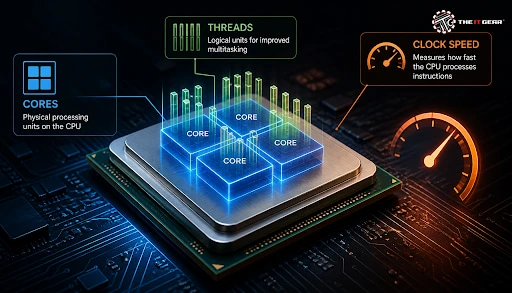
The specification of a central processing unit defines every technical capability of the processor. The key attributes are cores, threads, clock speed, cache memory, and TDP. Cores are the physical worker units, each handling its own instruction stream.
Threads are the tasks a core can process — most modern CPUs run two threads per core using Intel Hyper-Threading or AMD SMT. Clock speed, measured in GHz, tells you how many cycles the CPU executes per second, while TDP indicates heat output and cooling needs. Together, these processor specifications reveal a CPU's true performance potential.
Cores enable parallel processing, but software must be written to use them. Single-threaded apps benefit more from high clock speed, while multi-threaded workloads like video editing and rendering scale across cores. That is why a processor specification always lists both core and thread counts.
What Does 8 Cores 16 Threads Mean?
An 8-core, 16-thread processor packs eight physical cores, each handling two threads simultaneously via simultaneous multithreading. The operating system sees 16 logical processors, allowing 16 instruction streams at once.
This suits gamers who stream, 4K video editors, and virtual machine users. The gain from SMT is typically 15–30 per cent, not double, since threads share the core's execution resources. Processors like the AMD Ryzen 7 5800X3D or Intel Core i7-14700K fall into this performance tier.
What Does 6 Cores and 12 Threads Mean?
A 6-core, 12-thread configuration is the mainstream sweet spot for Indian buyers. It delivers six physical cores and twelve logical threads for smooth gaming with headroom for background apps.
Productivity tasks like coding and photo editing also benefit. Most mid-range Intel Core i5 and AMD Ryzen 5 processors use this layout, making it the best value for balanced builds. Chips like the Intel Core i5-14400F or AMD Ryzen 5 7600 are excellent examples.
Clock speed, also known as CPU speed, measures cycles per second — a 3.5 GHz processor completes 3.5 billion cycles every second. Base clock is the guaranteed minimum, while boost clock pushes higher when thermal headroom allows, such as Intel Turbo Boost or AMD Precision Boost.
Not entirely — real-world speed also depends on IPC, core count, and cache. A newer architecture at 3.5 GHz can beat an older chip at 4.0 GHz. Reference ranges:
Normal CPU clock speeds rose from 100–500 MHz in older systems to today's 2500–5000 MHz, so always compare within the same generation.
CPU Clock Speed: How to Check
Open Windows Task Manager, click Performance, and select CPU to see live clock speed. Tools like CPU-Z and HWInfo show per-core frequencies, boost behaviour, and thermal throttling — handy for verifying a new CPU.
What Is Clock Speed in a Mobile Processor?
Smartphone SoCs use an Arm big.LITTLE design with high-performance cores at higher clocks and efficiency cores for battery saving. A phone chip may advertise 3.2 GHz peak, but sustained speed drops to manage heat and battery life — quite different from desktop CPUs.
Overclocking pushes clock speed beyond factory limits. AMD's Precision Boost Overdrive automates safe boosts, while Intel users adjust the multiplier in BIOS/UEFI on unlocked "K" chips. Higher clocks demand better cooling and power delivery — check out CPU air coolers and AIO liquid cooling options, and remember that overclocking can void warranties.
The suffix on laptop processors defines the power class in CPU specifications:
For Indian students, U-series works best; for professionals, P-series; for gamers and creators, H-series.
Core i3 processor specifications typically include 4–6 cores with Hyper-Threading, enough for office work, coding, and entry-level gaming. The Intel Core i5 specification steps up to 6 cores and 12 threads with boost clocks above 4.5 GHz, ideal for serious gaming and content creation.
AMD spec sheets for the Ryzen 5 series show comparable cores with larger caches and strong multi-threaded performance. For example, the AMD Ryzen 5 9600X offers excellent value, while the Intel Core Ultra 7 265K pushes performance further.
Good CPU specs mean matching cores, threads, and clock speed to your workload, not buying the most expensive chip. The IT Gear offers a wide range of Intel processors and AMD Ryzen processors at competitive prices across India.
Before you buy, run through this quick checklist:

Mastering CPU specifications turns a confusing spec sheet into a confident buying decision. Prioritise cores and threads for multitasking, clock speed for single-core work, and TDP for cooling.
Explore The IT Gear's collection of processors, motherboards, and cooling solutions to find your perfect match.
Q: What is a good clock speed for a CPU?
Everyday use needs 2.5–3.5 GHz; gaming needs 3.5–4.0 GHz; heavy workloads demand 4.0 GHz and above. Architecture matters too.
Q: Is clock speed and processor speed the same?
Not exactly. Real processor speed also depends on IPC, cores, threads, and cache. A newer CPU at lower GHz can outperform an older high-GHz chip.
Q: What does TDP mean in CPU specifications?
TDP is the maximum heat a CPU generates under load, measured in watts. It tells you what cooler you need — 65W chips work with stock coolers, while 125W CPUs need premium towers.
Q: What is cache memory in a processor specification?
Cache is the CPU's internal L1/L2/L3 memory hierarchy. A larger L3 cache reduces reliance on RAM, boosting gaming and productivity performance.
Q: Does more cores always mean better performance?
No. If software is not multi-threaded, extra cores stay idle. For single-threaded apps, higher clocks and better IPC matter more.





#No. 9, 5th Floor, Max City Center, T. P Lane, Sadar Patrappa Road, Bengaluru - 560002 (Karnataka)