Select a category

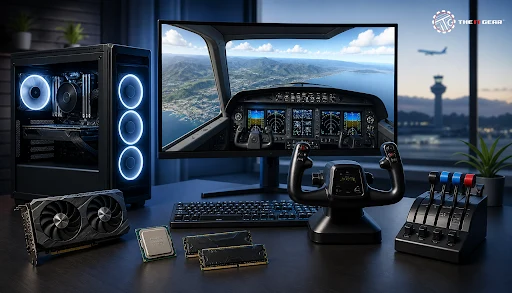
Few PC tasks can distinguish between a good value build and an overly expensive one like flight simulation. Most community builds for Microsoft Flight Simulator 2024 use 32 GB of RAM as the balance point, treat 64 GB as the next step up, and most experienced simmers recommend pairing a 3D V-Cache processor like the Ryzen 7 7800X3D with a mid-tier GPU to prevent frame times from scaling.
In India, a realistic plane simulator setup can start from less than Rs. 80,000 and can go all the way to Rs. 3,00,000 and more, so knowing what is going to make a difference makes more sense than just trying to get the best possible upgrade.
A flight simulator PC is a desktop built more exactly to meet the requirements of simulation software such as Microsoft Flight Simulator 2024, X-Plane 12, Prepar3D, and similar programs, rather than focusing on the needs of typical action games. These simulators perform ongoing calculations for weather, air traffic, aerodynamics, and avionics in real time, while also streaming worldwide terrain data from the internet. This combination creates a mainly heavy workload, which is why standard gaming PC specifications often fall short for these applications.
Flight simulation relies mostly on the CPU. The processor handles simulation logic, AI traffic, physics, and avionics, and a less capable CPU can cause stuttering even if the graphics card is underutilized. Processors with large caches, such as AMD's 3D V-Cache models, are preferred for this reason.
GPU demand increases with higher resolutions and detail settings, so a more powerful graphics card becomes important above 1080p, but the CPU determines the minimum frame rate. Focus on the processor in your budget, followed by the graphics card.
A flight sim system is two systems in one: the processing hardware that runs the simulation, and the control hardware that you, the pilot, actually fly with. Newbies often excel at the former while totally botching the latter – and then scratch their heads over how "empty" and "flat" the experience is.
What Are the Essential Components Needed to Build a PC?
Flight Simulator Accessories That Complete the Cockpit
A keyboard can technically operate an aircraft, but a control column (like a yoke or joystick), a throttle quadrant, and rudder pedals are what transform a PC into a cockpit. Rudder pedals manage yaw and taxi steering, which keyboard inputs cannot replicate smoothly, and they make landings much more controllable. The IT Gear offers flight simulator accessories alongside essential components, allowing the entire setup to be sourced from one location.
Specs will vary by simulator and the resolution you fly at, so see the official recommended-spec page of your preferred title before you buy anything. The table below offers a rough guideline for Microsoft Flight Simulator and X-Plane.
Flight Simulator 2025 PC Requirements

Using the minimum row as the 1080p baseline, use the high-end row as the realistic (high detail) target for 1440p and 1440p+.
A cheap gaming PC for Flight Simulator then needs to shield CPU and RAM while stepping down a tier on the GPU and designing a cheap case for your PC. Downgrading RAM to 8 GB or using an HDD instead of an SSD hurts far more in stutter than it does in rupees. Focus on processor, 32 GB of RAM, and an NVMe drive — skimp on RGB lighting and premium enclosures.
A budget sim PC will cost about Rs. 70,000–90,000. A mid-range build should be about Rs. 1,50,000–2,00,000 and a high-end 4K-capable rig Rs. 3,00,000 plus. Throw in a yoke, throttle quadrant, and rudder pedals for another Rs. 15,000–60,000. That means the full flight simulator cost is determined less by what you're playing with and more by how realistic you want a plane simulator to get.
Builds change a little each year as the demanding new sim versions climb their requirements, but the priorities never do: a cache-happy CPU, 32 GB of RAM, speedy NVMe drives, and a GPU that has room to grow. MSFS 2024 is still the biggie, so if your build is OK with that, X-Plane 12 and Prepar3D should be fine.
A flight simulator PC values smoothness, not just raw power: the right CPU, 32 GB of RAM and speedy NVMe storage will beat a more obviously overkill build at a far lower price. Nail those three and supplement them with decent flight simulator peripherals, and even a middle-of-the-road PC will feel truly immersive. The IT Gear stocks all the CPU, graphics memory, storage, and controller hardware to put together that kind of PC with one quick order.
Can a mid-range flight simulator PC handle 4K?
Not comfortably at high detail. High 4K puts the load on the GPU in sharp incline, so a mid-range GPU will need you to sacrifice detail. For hassle-free 4K with a high-end GPU, you want a cache-heavy CPU with 32 GB or more of RAM.
Do flight simulator accessories work across different simulators?
Throttles, yokes, and pedals — most of these are HID devices, and will work with MSFS, X-Plane, and Prepar3D. You'll likely need to remap axes and buttons for each simulator, but the devices should all be usable across the platforms. Browse flight sim yokes and joysticks and simulator pedals to find cross-compatible options.
Is a pre-built flight simulator PC worth it in India?
A pre-built simulation PC can reduce assembly time and typically includes a single warranty, but it may come with components that are not ideally matched. Building your own PC or purchasing parts individually allows you to manage the CPU-to-GPU ratio, which is most of all important for flight simulators compared to most other game genres.





#No. 9, 5th Floor, Max City Center, T. P Lane, Sadar Patrappa Road, Bengaluru - 560002 (Karnataka)






Looks like you haven't added anything yet. Explore our builds, components and gear.
Continue shopping