Select a category

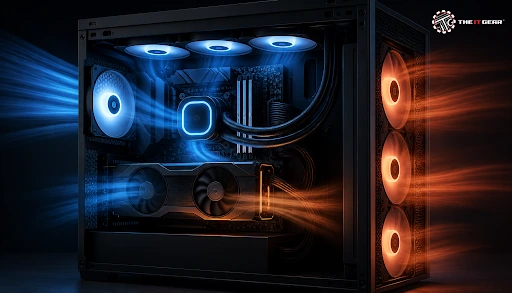
The experiment that is probably the most copied in the world of PC builders also happens to be the easiest. In a popular r/buildapc thread, which went through 368 posts, a builder changed the case only, kept the identical CPU, cooler, and thermal paste, and was rewarded with load temperatures dropping around 15 degrees Celsius.
What this proves is that PC case cooling does have a real-world impact: the case determines whether the cooler you already own works at all. In India, where summer room temperatures regularly reach over 35°C, that's the difference between a silent and a throttling PC.
Case airflow is perhaps the most misunderstood aspect of our hobby. What is case airflow? It is how air enters, moves through, and exits your chassis so that all heat-producing components - CPU, GPU, VRM, RAM, SSD - have their heat dumped into the air and that air gets continuously replaced. The case itself does nothing directly for the temperature of your components. It is the environment in which coolers work.
A case with unrestricted intake and no constricted passage for the air to exit will keep a continuous flow of ambient temperature air over the CPU cooler, GPU heatsink, and motherboard.
A restricted case will keep recirculating what it pushes out. This means your cooler is stuck wasting its cold capacity cooling already hot components. Component temperature comes down to three variables: cooler capacity, mounting technique, and airflow in the case.
Independent video testing has achieved very similar gains of around 11°C from airflow or mounting changes alone. The key takeaway isn't that certain configurations are magic; it's that swapping cases resets the boundary conditions for every cooler within it. Inexpensive chassis modifications should be considered before investing in a larger chassis.
Heat is more directly addressed by the reliability argument. Temperatures are almost always talked about in terms of boost clock and frame rate, but heat rapidly accelerates every mechanism of wear a modern IC suffers - electromigration of the interconnects, dielectric breakdown, aging of the capacitors, time-dependent dielectric breakdown, and fatigue from the expanding and contracting in thermal cycles.
Extended high temperatures also induce thermal throttling, which can reduce boost clocks and turn a zippy CPU into a slug. PC case cooling preserves performance and durability.
Yes, and more often than not, the GPU is the single worst offender. Contemporary graphics cards vent 250–350W of heat directly into the chassis, and that warm air needs to go somewhere. If it can't be exhausted, it gets recycled by the GPU fans, and core temperatures rise.
The same reasoning applies to the VRM stages around the CPU socket, the memory modules, and M.2 SSDs, none of which have their own dedicated active cooler. A decent case allows plenty of cool, fresh air through the interior; a bad case closes in on that return path and makes the whole rig run hotter.
Chassis designed around airflow with no obstructions at the front intakes will always run cooler than visual appeal-only designs using solid panels. The compromise is clear, so know it before you buy.
Mesh, Honeycomb and Perforated Fronts vs Tempered Glass
Ensure marginally more intake than exhaust so the case runs positive pressure. Cool air is introduced with front or bottom fans, and hot air is forced out through rear and top exhaust fans. This minimizes dust accumulation, as the case maintains positive pressure by forcing the hot air out through unfiltered gaps rather than drawing dust in through unfiltered gaps. The three biggest causes of poor airflow in a well-designed case are cable clutter, large GPUs, and dust filters not being cleaned.
No air or liquid cooler can lower component temperatures below the air (or fluid) it breathes. Cooler performance is measured only in "degrees over ambient air", not a fixed number. If your room gets 10°C warmer, you will see your components get about 10°C warmer, because your entire cooling chain loses that headroom.
This is the reason why an 18-20°C air-conditioned room and a 25-30°C sealed room can give very different load temperatures with the same hardware - community threads show chips like the Ryzen 7 7700X consistently hovering near their 95°C thermal throttling limit in these conditions. During Indian summers, that one factor may cause a January-stable build to start throttling in May.
Yes, they do, and more than most buyers expect. A liquid cooled computer case is not a case that stays cool on its own; it is a case that must accommodate a radiator. An AIO or custom loop pulls heat from the CPU to the radiator, but the radiator still sheds that heat into the case air, and a radiator can only shed heat if cool air blows through its fins.
A water-cooled computer case mounting its radiator behind a sealed glass front will perform worse than a cheaper air cooler in an inexpensive mesh front chassis. Case fans still remain a necessity for the radiator and for the VRM, RAM, GPU, and drives that liquid cooling does not reach.
When it comes to an AIO, case fans are most important in one way: providing air to the radiator. Front-mounted radiators receive intake air, generally yielding the lowest temperature you can provide for the best CPU temps, while top-mounted radiators pull in air that has already been preheated by the GPU, will have a couple of degrees of "cost" tied to the additional heat.
Running additional fans that are not the radiator and are not working as intake or exhaust has diminishing gains, but removing the path of intake can be very expensive unlike a slight radiator upgrade.
Maybe. Not quite as often as the buyer might think. If the case is under-ventilated, blocked by a solid front panel, or has fans blowing in all directions, then extra fans can be a boon. Their usefulness ceases once they stop providing more air than the cooler can use - at that point the bottleneck is the cooler, the mounting, or the room.
PC case cooling is the most affordable performance enhancement that almost no one ever considers. An airflow-optimized case will safeguard your CPU, GPU, VRMs and storage media, let your current cooling solution operate at the speed it was rated for, and prevent the gradual silicon deterioration caused by prolonged, excessive heat.
If you are assembling or updating in India, The IT Gear offers airflow-optimized cases, 120mm and 140mm fans, air coolers, AIO liquid coolers, and thermal compounds, so you can tailor a case to your already-owned peripherals instead of hoping.

What is a safe CPU Temperature under load?
Most contemporary desktop CPUs are capable of running safely up to ~95-100°C, though constant operation above 85°C generally indicates throttling and reduces the lifespan of parts. A reasonably cooled system should be in the 60-75°C range during gaming under 25°C or lower room temperature.
Is a Glass-Front Case Always Bad for Cooling?
Not necessarily. Some glass front cases with wide side intakes and solid fan pressure can be okay, mainly if fitted with a mesh side or bottom intake. The problem is sealed glass with micro vents, which is by far the most common and by far the most restrictive.
How Many Case Fans Do I Actually Need?
Usually, two intakes and one exhaust are suitable. If you have high-wattage GPUs and/or water cooling, three intake and two exhaust are best. Beyond that, additional fans mostly improve noise-normalised performance rather than peak temperatures.
How can I lower CPU temperatures on a prebuilt PC?
Begin by checking the cooler mount and thermal paste, then add front intake fans if the chassis has available mounts. Usually, prebuilts come with cramped conditions regarding the case and the stock coolers are concerned, so getting the airflow better with the case fan before swapping the cooler usually results in better performance.
What Are Some Cheap and Simple Ways to Reduce a CPU's Working Temperature?
Cleaning dust filters, reapplying thermal paste, correcting fan direction, removing drive-bay obstructions and creating a sensible fan curve cost nothing. Several degrees are routinely recovered for free.





#No. 9, 5th Floor, Max City Center, T. P Lane, Sadar Patrappa Road, Bengaluru - 560002 (Karnataka)






Looks like you haven't added anything yet. Explore our builds, components and gear.
Continue shopping