










Select a category

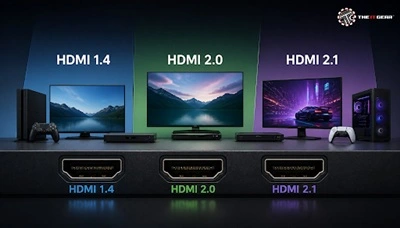
Walk into any Indian electronics shop and you'll find a 4K TV for less than ₹50,000, a console on demo and a wall of HDMI cables that all seem the same. They're not. Bandwidth is king: HDMI 1.4 manages 10.2Gbps, HDMI 2.0 manages 18 Gbps and HDMI 2.1 manages 48 Gbps – nearly three times what 2.0 can.
Plug a 1.4-era cable into a 4K@120 setup and not a single creature will cry out that you're missing out on quality; you'll simply receive 4K@30 or HDR that refuses to switch on.
There's a single digital cable called HDMI or High-Definition Multimedia Interface. It carries video as well as audio, and replaces the component, composite, and RCA audio cables that preceded it. The number of each version represents what a port and its chipset are capable of — the bandwidth ceiling and whatever features are built on top of it.
The version is embedded in the silicon, not the copper. So TVs, consoles, and chipsets are certified to a version; cables are branded based on speed tier, such as Standard, High Speed, Premium High Speed, and Ultra High Speed. An "HDMI 2.1 cable" label is simply marketing hype, not a certification.
Here is what most of you want to know first, before you get to the details.
Since there's only 10.2 Gbps of 'pipe', all of the resolution, refresh rate, colour depth must simultaneously fall within this pipe. When you go to 4:2:0 you 'quarter' the colour, fine on a film image but, on a desktop, it just smudges details of fine text.
Moving from 10.2 Gbps to 18 Gbps makes 4K a default, rather than a compromise.
HDMI 2.0 supports 4K at 60Hz with full 4:4:4 chroma, 32 audio channels and 1536 kHz sample rate, and later versions implemented both HDR10 (2.0a) and HLG (2.0b). If you're running a legacy HDMI 1.4 cable, that's the maximum you'll be able to do, not your TV.
Yes, physically, and functionally. All generations use the same 19-pin Type-A connector, so it always fits, and the link negotiates down to the lower standard. The main obstacle is HDCP: many older 1.4 ports support only HDCP 1.4, which can block protected 4K streams from Netflix or Prime Video.
But HDMI 2.1 blows the lid off the 18 Gbps limit to 48 Gbps (2.67x headroom), providing the bandwidth for 8K@60, 4K@120, HDR using scene by scene metadata (Dolby Vision, HDR10+) and eARC for Dolby Atmos and TrueHD, as well as a dedicated gaming group consisting of QFT, QMS, ALLM, and VRR. Internally, Fixed Rate Link replaced TMDS to get those speeds.
It's 240Hz, because in 1080p its smaller pixel load (and extra bandwidth) is spent on refresh rate not resolution. Display Stream Compression is generally what gets you higher but it's most likely you'll reach your monitor or GPU first.
HDMI 2.2 announced in Jan 2025: 96 Gbps, new Ultra96 cable certification, and the Latency Indication Protocol for synchronising audio/video through receivers and soundbars. There's absolutely no mainstream TV, console, or streaming box in India that calls for 96 Gbps today.
No. An Ultra High Speed cable is great for 4K@120 and 8K@60. Ultra96 only matters if you're wiring a room for displays that aren't available yet.
The question can be interpreted in two ways. If you are referring to the HDMI generation, the optimal choice is the version that both your display and source device support—using the lowest common version is the only important guideline.
If you're referring to the numbered ports on your TV, they're seldom the same: most sets have an eARC port for audio return, one full-bandwidth 2.1 port for gaming, and 1.4 or 2.0 ports for just about anything else.
Place the soundbar/AV receiver on the eARC port; the PS5, Xbox, or gaming PC on the full-bandwidth 2.1 port, and the streaming sticks on the rest of the inputs. Labels printed on the back of the TV or user manual are more reliable than names like HDMI 1.
Basically: HDMI 1.4 covers 1080p and 4K@30, HDMI 2.0 is the 4K@60 workhorse, HDMI 2.1 is where 4K@120, 8K, and gaming features shine, and HDMI 2.2 is the latest 96 Gbps standard. Buy for the devices you own, not just for the biggest number on the box.
At The IT Gear, certified HDMI cables are listed by speed tier with clear specifications and INR pricing, so matching a cable to your TV's ports takes a minute instead of an afternoon of guesswork.
Do I need an HDMI 2.1 cable for a 4K TV?
With 2.1 ports on the source and display, and you want 4K@120, VRR or eARC. Otherwise you can go with a Premium High Speed cable.
Do expensive HDMI cables improve picture quality?
Not over short runs. A digital signal is either in the form in which it was transmitted or not there at all, so accreditation is far more important than cost.
Will an old HDMI cable cause a black screen?
Occasionally. Not all bandwidth restrictions are apparent; some manifest as no-signal, flickering, and lower resolution, so be sure to test a guaranteed cable before blaming the TV.





#No. 9, 5th Floor, Max City Center, T. P Lane, Sadar Patrappa Road, Bengaluru - 560002 (Karnataka)






Looks like you haven't added anything yet. Explore our builds, components and gear.
Continue shopping