Select a category

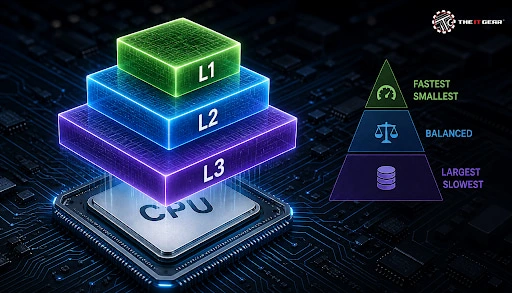
The term cache in CPU (level 1, 2, or 3) is an important processor specification which you need to be aware of. It is the processor cache and can be thought of as temporary storage for the CPU to reduce the frequency of reading from the main memory, which is usually slower.
A large amount of cache can mean the CPU uses less main memory and it is an important factor in CPU performance. The performance difference between CPU and RAM is significant, where a CPU is able to perform a few operations within a nanosecond while reading operations from main memory can take 100's of cycles. Cache in CPU is a great way for a processor to bridge such a gap.
The cache in CPU is a very high-performance memory that works as a very small memory buffer located on the processor or just very close. It functions on the principle of locality, data accessed recently (temporal locality) or a nearby one (spatial locality) will likely need to access it again.
Cache hit and miss are the main processes of cache. Hit means that the data requested is really in a cache level, which the CPU can use right away without delay. Yet, for a miss, the CPU has to look for the data at a slower level, resulting in a miss penalty. Modern processors rely on three cache levels - L1, L2, and L3 - to strike an optimal balance between speed, capacity, and cost in such a hierarchy where speed degrades per level but size increases. As such, the CPU rarely needs to make the expensive main memory visit, but instead just the cache hierarchy.
L1 cache CPU is the fastest and closest tier of cache memory on a processor, since it is part of the core (processor's core) it is so fast that 2-4 cycles is all it takes to get it out of the cache. Still, the size is the most limited here which is around 32KB-64KB per core. Modern processors divide the L1 cache into two parts, one that carries the instructions only (I-cache) and another that handles data (D-cache). That's why the CPU can work on multiple things at the same time.
L1 cache being located right next to the core is a factor that minimizes delays and makes it the quickest. On average, 64KB per core quad-core processor would have a total of just 256KB L1 cache in the whole chip. That kind of engineering allows the L1 cache to be the one that serves the quickest of all memories in the system - still it needs a very large amount of physical die space.
L2 cache CPU is one of the memory tiers and is larger than the L1 at 256KB to 2MB per core. Because it sits slightly further from the core's processing units, its access latency is higher, taking roughly 10 to 16 cycles. L2 cache helps the CPU to catch the misses that L1 cache couldn't catch before it has to search further.
Many recent cache designs make the second-level (L2) cache a private per-core cache, and it usually refers to the type cache that can hold both instructions and data in the same space.
The old L2 was physically on the motherboard as a separate chip at one time. It is now located in a CPU die reducing the time required for access by a lot.
This shift from off-die to on-die L2 has been a significant turning point in processor development, and it is one of the reasons behind the fast performance in normal computer programs.
The third-level (L3 cache processor) of the processor is the largest and also the slowest part of the cache with a capacity typically running from 4MB to 96MB or even more, which is shared among all cores. The latency of about 30-70 cycles, makes L3 be the last-level Cache (LLC) after which the CPU needs to go to main memory.
Compared with L1 and L2 caches, it is much slower but faster than RAM, which is the CPU's working memory. So, it is very important to the CPU as a buffer of performance.
A shared cache like L3 helps efficient exchange of data between cores and reduces the CPU's need for memory access. AMD's chiplet design is one of those where L3 is located within each core complex die (CCD), whereas Intel places L3 cache at the center of monolithic cores.
But AMD's 3D V-Cache technology is a technique that can be used to stack extra L3 on top of the chip to achieve an increase in the gaming performance that one usually sees. This works as a very clear indication of the ways in which processor cache design affects real-world outcomes.
Whenever a CPU core wishes to fetch a datum, it does so in the order of cache levels: L1 first, L2 second, and L3 third with memory being accessed last.
We'll walk through an example, shall we? Suppose a quad-core processor with 64KB L1 per core, 512KB L2 per core, and 8MB L3 in total shared across all cores. When a core issues a data request, L1 is searched and a find results in a hit in 2-4 cycles.
If it hits nothing, L2 is searched, taking about 10-15 cycles. A miss from L2 prompts a search of L3 over about 30-70 cycles. Only when the CPU fails to find in all the levels will it be forced to go to RAM which incurs a penalty, when it comes to the CPU's pipeline, that for hundreds of cycles the work is halted.
Cache policy or caching inclusion strategy is one of factors which determine how the data is positioned among different levels of cache. Intel typically relies on inclusive cache in which the content of L1 is also found in L2 and L3 making cache coherence easy.
AMD used an exclusive cache where data existed in a cache at one level only, thereby maximizing the amount of usable cache space without a loss.
Below is the comparison table giving an overview of the cache size across different processor tiers.
This is a rough estimation only, and you can expect that there is also a significant difference among cache size and speed with core architecture as well as manufacturer. For normal computing activities, a CPU with an L3 cache capacity around 16 MB is more than sufficient.
A larger L3 storage is a big plus for game players. AMD's 3D V-Cache parts that can provide a maximum of 96MB L3, clearly show how performance measured in frames per second (FPS) increases drastically.
If you process a lot of data, a big cache size in the processor can make a real difference. To see the cache of your processor, Windows offers a task manager or, you can use msinfo32 as well. When it is just your processor's clock speed and number of cores you are comparing, don't forget to check the size of the caches as well.
At The IT Gear, you will find processors with full specs indicating L1, L2, and L3 cache, so you can easily pick the best model.

Processor cache is one of those specifications that quietly defines how responsive your system feels. Understanding what L1, L2, and L3 cache do helps you choose the right CPU for your needs instead of chasing raw clock speeds alone.
When building or upgrading your PC, always pay attention to the cache numbers on the spec sheet. Explore the range of processors at The IT Gear, to find a model with the right cache configuration for your workflow and budget. If you're also curious about how other components like RAM or graphics cards impact performance, check out our detailed guides.
Is 16MB L3 cache good?
Yes, a 16MB L3 cache is pretty good for regular and mid-level processors. A 16MB cache has sufficient cache size for gaming and productivity tasks. Yet, when it comes to extreme processors such as AMD's 3D V-Cache, L3 can be as large as 96MB to offer much larger headroom for workloads which are very demanding on resources.
Is L1 cache faster than L3 cache?
For sure, L1 is much faster than L3, since L1 latencies are in cycles whereas L3 latencies are in multiples of that. What L1 cache lacks with storage compared to L3 is compensated for by its speed which the designers of cache systems keep in mind while working on their models.
How much L1 cache is good?
On modern processors, L1 caches are usually between 32KB to 62KB divided between instruction and data cache. In other words, L1 cache is only supposed to feed the pipeline, not cache big chunks of data, which is why such small sizes are more than adequate. High-end Intels and AMDs have 64KB or a little more in L1 per core.
Where is the L3 cache located?
L3 cache is on the processor chip itself. Within the chiplet structure of AMD chips, each core complex die (CCD) is given a set of L3 caches. L3 cache placed at the central place on a single die for Intel. x86 processors of the mainstream have always had die-level L3 cache.
L2 vs L3 cache for gaming: which matters more?
L3 is actually more important for gaming, as it operates on large amounts of data that exceed the capacity of the L2. That means, with a large L3 one can have more game data that the CPU is close to, which decreases the number of RAM trips. This is probably how the recent generation of AMD 3D V-Cache CPUs have achieved a significant boost in their performance on the gaming benchmark tests.





#No. 9, 5th Floor, Max City Center, T. P Lane, Sadar Patrappa Road, Bengaluru - 560002 (Karnataka)






Looks like you haven't added anything yet. Explore our builds, components and gear.
Continue shopping