Select a category

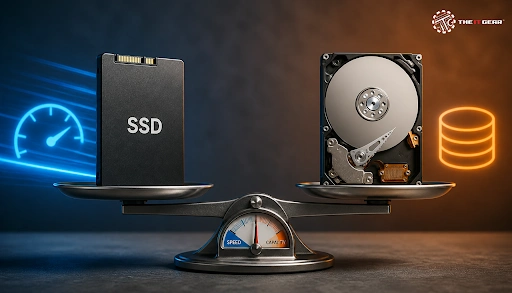
In India, a slow laptop or desktop is often held back by an outdated hard disk drive. Replacing that drive with an SSD is one of the most noticeable upgrades you can make. However, if you want to back up large amounts of data or create a large movie library, an HDD still makes sense. We compared ssd vs hdd simply - and here is the guide you need to choose whether to put just an SSD, an HDD, or both in your desktop.
Short answer: An SSD is best for speed, durability, and responsiveness, whereas an HDD is great for a low cost per GB and large storage. Most people will be better off if they choose an SSD for a single-drive computer. But when considering storing a couple of movies, backups, or archived files, an HDD will come into its own.
SSD full form

SSD stands for "Solid State Drive". Data is stored on NAND flash memory chips, and there is no movement in the system. So, an SSD has such a fast access time which allows reading a file as quickly as within a few microseconds while at the same time being silent, resistant to shocks, and energy-friendly.
HDD full form

HDD stands for Hard Disk Drive. It has moving parts - spinning disk or magnetic platter, spindle, actuator arm, and read/write head. Due to the physical motion of the read/write head to the track, seek time is part of HDD operation as well as rotational latency.
SSD vs HDD meaning
SSD vs HDD meaning can easily be translated as: The key point upon which the storage systems work is different. One (the SSD) uses electrical storage, and the other (the HDD) uses magnetic storage on spinning disks. An SSD is faster, more rugged, and smaller in size. Versus SSDs, HDDs can store larger amounts of data without spending as much money per rupee, though this advantage is narrowing down now.
An SSD boots up your computer within seconds and allows you to open apps rapidly and transfer huge files very swiftly. Since an HDD needs the mechanical bits to move first before data can be accessed, the HDD is perceived as slower. For normal usage, the preference for SSD over HDD is usually due to these reasons.
Why do SSDs feel faster?
SSDs beat HDDs in random reading and writing operations. Random I/O is crucial for booting the system, downloading software updates, web page tabs launching, and loading game levels. HDDs do better at reading or writing files sequentially, but SSDs are more powerful even in that matter.
HDDs are normally the cheapest type when it comes to the price per gigabyte. That's why HDDs of 1TB, 2TB, and larger have remained favored for backing up data. SSDs cost more per GB, but what you're paying for is fast speed, quiet operation, and less chance of mechanical failure.
Through The IT Gear, you can compare SSD and HDD products by storage capacity, interface, and form factor before purchasing.
SSD vs HDD Lifespan
When it comes to HDD vs SSD longevity, the fact is: SSD life is measured in TBW (Terabytes Written), number of write cycles, and the use of wear leveling. Features like TRIM and S.M.A.R.T. monitoring enables you to care for the health of your SSD.
HDD life is determined through mechanical wear, MTBF (mean time between failures), and head crash risk. No matter which drive you choose, it is only a matter of time before they fail. The only solution is to back up your data regularly on a reliable external hard drive.
SSD or HDD which is better for laptop
An SSD is usually better for laptops. In the form factor, you may choose a 2.5-inch or M.2 NVMe SSD, it offers faster speed, low noise, greater shock resistance, and lesser power consumption. The problem with a 3.5-inch HDD is that it might not physically fit into today’s laptops.
SSD or HDD, which is better for gaming
An SSD is the ideal choice for games. It speeds up the loading time of the game, the delay in texture display, and the occasional freezing during gameplay of large, interactive worlds. Given the size of today's games, it is typical for a majority of gamers to keep their OS and games on an SSD with super fast access speed and other games on a regular HDD.
For a deeper breakdown, read our guide to gaming PC storage in 2026.
Is 2TB of SSD overkill?
For the home user, 2TB of SSD is not too much, especially when one is engaged in video editing, playing big computer games, or keeping track of a lot of projects. However, if your PC usage is only to browse the web and run some office apps, then a 512GB or even a 1TB SSD is enough. A 1TB SSD and an HDD of larger capacity is likely the most beneficial option.
Which is better, a 1TB HDD or a 256GB SSD?
As the system drive, the 256GB SSD performs quite faster, resulting in a more efficient PC. Meanwhile, the 1TB HDD can accommodate more data but is slower in speed. It would be the perfect budget configuration to have a 256GB SSD for OS and a 1TB HDD for saving files.
Is it better to have a 1TB HDD or 512GB SSD?
When it comes to normal performance, a 512GB SSD usually wins out. It is a good balance of storage for mainstream apps and some games. A 1TB HDD only makes sense if you're desperately in need of low-cost storage and don't mind slower speeds.
Which is better, 128GB SSD or 1TB HDD?
It’s possible to run a lightweight laptop on a 128GB SSD, but the OS and updates could fill the storage space quickly. A 1TB HDD gives you space but lags in speed. The smart setup for most people combines a 128GB SSD with a 1TB HDD instead of choosing one over the other.

The battle of SSD against HDD has more than one side. The SSD is best for performance when you need quick access to your files day in and day out, whereas an HDD offers mass storage at a low cost. To get the balance, a dual-drive configuration for your computer would be the ideal solution for most Indian users.
The IT Gear can support your decision process and help you with the best SSD or HDD selection for your needs, whether it is for your laptop, PC, or backing up stuff.
Can I use both an SSD and an HDD in one PC?
Yes. Many desktops support both. Use the SSD for the operating system and apps, and the HDD for media, backups, and archives.
Do SSDs lose data if left unpowered?
Flash storage like SSDs does not wear out easily and keeps your data safe for years, but it is not recommended to leave SSDs unpowered for very long. So if you need a long-term data storage solution, you may want to make multiple backups of your data and sometimes even power up the drives.
Is an HDD ever better than an SSD?
Yes. HDDs are better when capacity and cost per GB matter more than speed, for example, for backups, CCTV storage, or large media libraries.
Which drive is better for video editing?
An SSD is the best drive for editing videos, as it is efficient enough to process big file operations and allows the user to do video scrubbing smoothly. An HDD is great if you want to archive your completed projects.





#No. 9, 5th Floor, Max City Center, T. P Lane, Sadar Patrappa Road, Bengaluru - 560002 (Karnataka)