










Select a category

Buying a gaming PC in 2026 is a thrilling experience, but there is one query that almost every Indian gamer gets confused about - how much gaming PC storage is actually sufficient? With the new generation AAA titles like Call of Duty, Baldur's Gate 3, and even 2026 releases taking in storage from 50GB to over 150GB, the time of surviving on 256GB or 512GB is definitely a thing of the past.
Indian gamers, whether on a budget or those aiming for high-end gaming PCs, require answers that would be realistic for performance, budget and future-proofing. Here we break down exactly which storage configuration is the right one for your gaming PC in 2026.
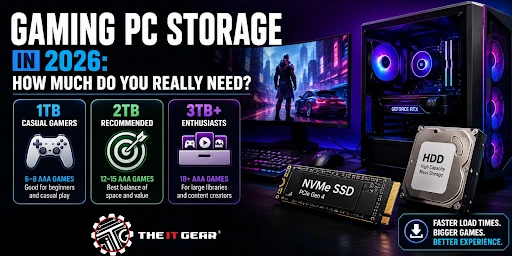
At the heart of the matter is a question that each Indian gamer asks, and rightly so. Apart from a few gamers who want to have an extensive collection of games, videos, and other creative work, others should consider 1TB as an absolute minimum and 2TB as the recommended target size that will provide a stress-free gaming experience. After all, how many games can one play at the same time? In fact, for the majority, 2TB is the ideal, while those who prefer large libraries might go for 3TB or more. See your own situation below:
A 1TB storage will be more than enough to store your OS, main programs, and around 6-8 latest AAA games. If slowly you are getting on with a game or two and then uninstalling the ones you have completed, 1TB storage will be enough for you. Also, from a budget perspective, this is the most affordable option for Indian gamers without breaking the bank. The price of a good quality 1TB NVMe SSD will be somewhere approximately Rs. 5,000 to 8,000.
The 2025 gaming report by NZXT suggests that 2TB of NVMe storage (PCIe Gen 4) is the right trade-off of space, speed, and value. With a 2TB drive at your disposal, you can easily load up 12-15 AAA games, have your Windows system run smoothly, and not worry about deleting a game just to try a new one. For Indian gamers who are versatile players or live in a household where PCs are shared, a 2TB SSD will relieve you from worrying about storage space. Usually, the price range for 2TB SSDs is from Rs. 9,000 to 15,000.
The price of 4TB SSDs is at such a level that almost everyone can afford them these days. A few gaming PC users fall under this category - those who record their playing sessions and media files, have a very large Steam game collection that they want to have with them always, and of course, those who also happen to be content creators. Though, most gamers should be perfectly fine with 2TB.
Though capacity is a feature that is important, the type of the storage device matters just as much. In 2026 people are still talking about the SSD vs HDD debate, but the situation is clear with a twist.
You should make an NVMe SSD (PCIe Gen 3 or Gen 4) your primary drive for your computer's operating system, main games, and applications that are used frequently. While loading from the hard drive can take minutes, loading from SSD unlocks 5-10x faster load times for games, no texture pop-in and calls for full usage of Direct Storage tech which is where game assets are loaded directly to the GPU without burdening the CPU. In the Indian market context, it is better to invest in an SSD for a better gaming experience rather than saving a few bucks only to spend multiple hours staring at a loading screen.
The role of an HDD in your system, if any, should be complementary. Don't throw away the possibility to own one as a large 'game vault' for:
Besides that, a 4TB HDD is priced roughly at Rs. 8,000-10 000 which is a lot cheaper compared to 4TB SSD (Rs. 25,000+). The cheapest solution for Indian gamers is to buy a 1TB SSD for active gaming and then pair it with a 2TB or 4TB HDD for storage.
Your storage drive and RAM are in constant communication. That means, with a proper understanding of this you will be able to identify performance bottlenecks more easily.
Due to shortage of RAM, a portion of your storage drive will be used as "virtual memory" or page file. Say if you still have 8GB or 16GB RAM in your system in 2026, then writing to and reading from an SSD by the system will be a constant activity. Because of this, the SSD will not only experience slower performance, but there will also be the risk of the SSD getting worn out sooner.
“32 GB of RAM is increasingly becoming the minimum for gaming purposes”, said Kingston in the December 2021 Newsletter. CyberPowerPC even states that for gameplay with heavy graphics or multitasking (e.g. game + Discord + stream), 32GB is still beneficial for FPS increase. For Indian gamers who decide to build a new PC in 2026, the below is the rule of thumb:
Thus, 32GB RAM + 2TB NVMe SSD is a good storage combo that will let the system run smoothly without having to make a swap to storage for memory. The IT Gear has bundled gaming RAM and SSD kits which are perfectly balanced for gaming machines coming in 2026.
When it comes to buying storage for a gaming pc device, the technical terms related to SSDs are not just for show - they actually affect the real-world performance. So for Indian gamers, here is what you need to understand.
Dynamic Random-Access Memory (DRAM)
The context here is to think about it as another piece of hardware that is physically in the SSD and helps the SSD run much faster by storing mapping tables. Those SSDs with DRAM provide superior performance levels under continuous workloads and a longer lifespan. These tend to be slightly more expensive but will be well worth the money if you are setting up your main drive.
Host Memory Buffer (HMB)
It is a technology that relies on the computer's system RAM as a cache, away around 64MB in size. Performance-wise, HMB SSDs mostly are as good as DRAM drives for gaming tasks, but pricewise they are cheaper. Indian gamers looking for a bargain will find that it is a good compromise.
SLC Cache
The section of a SSD's NAND flash that is run in Single-Level Cell (SLC) mode to get faster write speeds. SLC cache is what drives almost every modern SSD. What really defines the difference is the size of the cache and how a drive performs after the cache is full during large file transfers.
Now, PCIe Gen 3, Gen 4, and Gen 5 SSDs have been launched in the market. The reality is that Gen 4 will provide you with the best balance between gaming load times and cost. As far as Gen 5 drives are concerned, although they are faster (up to 10,000 MB/s vs 7,000 MB/s for Gen 4), the current games do not benefit from that high level of bandwidth. Being a bit slower, Gen 3 drives (approximately 3,500 MB/s) are still providing you with good performance but are gradually being taken off shelves.
Suggestion to Indian gamers: It is better to spend your money on a larger Gen 4 SSD rather than buying a Gen 5 at a premium. Gaming-wise, a 2TB Gen 4 NVMe SSD is the best balance that one can get for their rupee.
Based on real world figures, here's how many recent games you can fit on your storage. These are all titles from 2025-2026.
Even if you go to reddit platforms, most people on the r/buildapc's reddit community agree that "1TB minimum, 2TB recommended if gaming is the main use.
Before you rush off and buy your new gaming PC, here is a final checklist. Basically all your needs when it comes to gaming PC storage in 2026.
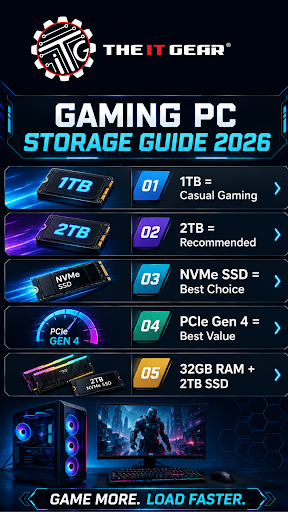
Picking the perfect gaming PC storage for 2026 isn't complicated at all. For most gamers in India, a 2TB NVMe SSD (PCIe Gen 4) gives the right mix of speed, capacity and affordability.
If you can't afford that, opt for a good 1TB drive now, and add a secondary HDD a few years later. The golden rule is simple: you should never have an SSD in your primary drive, because mechanical drives just have no business running modern-day OSes or AAA games.
Ready to purchase? buy a real storage product from The IT Gear. They can provide you with some of the best brands with 100% warranty coverage. Whether you want a cheap 1TB drive, or go for a 4TB SSD for professional content creation, The IT Gear will help you make the right decision, without forcing a bulky upgrade. Build smart, game better and forget storage issues.
Is 1TB enough for a gaming PC in 2026?
Yes, 1TB is enough for a gaming PC in 2026 for casual gamers. But modern AAA games are 100–200GB each, so storage fills fast. For heavy gaming + future-proofing, 2TB SSD is recommended for smoother long-term use.
Is 2TB SSD too much for games in 2026?
Yes and no. Today's AAA games are 50-150 GB. For a gamer who wants to keep 10+ games installed at any given time, a 2TB SSD is needed without any continual uninstalling and reinstalling. In India, for the gamer building his or her PC in 2026, 2TB is perfect.
should I have a heatsink even for my gaming SSD?
Most of the time you will not need an aftermarket heatsink for PCIe Gen 3 and 4 SSDs. Most motherboards come with built-in M.2 heatsinks. However, for PCIe 5.0 drives, a heatsink is highly recommended because they tend to throttle during long consecutive writes. For pure gaming workloads, Gen4 drives rarely need a heatsink..
What is the average storage capacity of a gaming PC?
As of 2026, the average gaming PC is built with 1TB to 2TB of NVMe SSD storage. Majority of budget builds usually opt for 1TB whereas mid and enthusiast builds tend to go for 2TB or pair 1TB SSD with 2-4TB HDD for bulk storage as HDDs are rare as primary drives today.
Are 32GB RAM or 64GB RAM better for gaming in 2026?
As standards go in 2026, 32GB is the minimum if you are only gaming. 64GB will do nothing for you for gaming and will be better suited for content creators, streamers or anyone running virtual machines. Rather, put the money you'd save going for a 64GB than a 32GB into a bigger or faster SSD.





#No. 9, 5th Floor, Max City Center, T. P Lane, Sadar Patrappa Road, Bengaluru - 560002 (Karnataka)