









Select a category

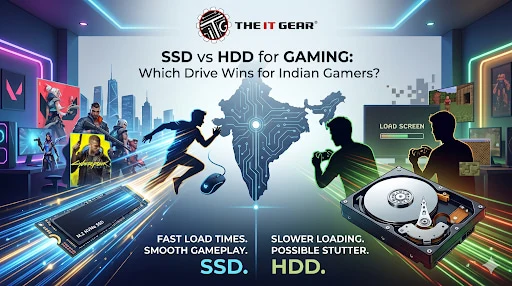
Getting a Gaming PC in India? There is one question that every PC gamer faces these days.
Between choosing an SSD (Solid State Drive) and an HDD (Hard Disk Drive). With AAA game file sizes crossing 100GB and with load times becoming a huge factor on gameplay experience, your storage choice has become more important than ever before. Whether you are gaming on Valorant, GTA V, or Cyberpunk 2077, the type of drive you select impacts not only your game's load times but also overall performance and smoothness.
So let’s see what the real-world implications are and what you should get based on your budget.
The main difference is actual technology. HDD magnetic platters spinning inside your case, with a mechanical 'needle' moving back and forth like a record player. SSD is non-mechanical flash memory (NAND).
There is a huge difference in speed, stability and loudness. For gaming, how quickly your game starts up, how quickly levels load, and whether you get lag spikes when traversing wide open spaces. Basically, with an SSD, gaming feels current and modern.
With a HDD, it feels old and sluggish.
Many Indian gamers ask: "Will an SSD help me get a higher FPS?
The direct answer is "No" sort of. FPSes are controlled by your graphics card and processor once a level is set in your RAM and VRAM.
But an SSD chops loading screens, texture pop-in and in-game stutter that can happen when your gaming PC is trying to stream new assets in games, like when your Far Cry 6 or Red Dead Redemption 2 horse and cart get stuck as they try to load new areas in the map. But since those assets are then loaded up onto the SSD, you don't get the same hitch.
PCworlds tests (Feb 2025) shows that a regular HDD will only achieve (~150MB/sec for reliable reads+ writes. A PCIe 5.0 SSD can reach 14,500MB/sec.
That's many times more than a regular HDD (max 150MB/sec). A simple SATA SSD will still reach 500-550 MB sec speed which is 3-4 times faster than an HDD. To put that into more concrete perspective, if a game took 45 seconds to load on an HDD it would only take 5-7 seconds on an SSD.
To a competitive CoD or CSGO player that can save you a fair few seconds in each game.
There's no need to buy the new PCIe Gen 5 SSDs thinking it's for gaming. As TechteamGB's test, the actual loading time difference between Gen 3, 4 & 5 SSDs while playing games is hardly considerable.
An excellent Gen 3 NVMe SSD(around 3,500 MB/s) takes so less time to load a game that you'll not notice the loading time difference with a Gen 5 drive. For Indian gamers on a budget, let's say, a Gen 3 or a Gen 4 NVMe SSD will do the most justice to our needs for gaming.
Arguably the biggest hidden issue with HDDs is the stuttering/hitching that occurs when playing demanding AAA titles. When you are driving or running through an enormous world, the game is constantly loading textures, buildings, NPCs etc from the storage device in the background.
The HDD's mechanical arm has to physically move around to different locations on the platter to load from, which causes slight delays.
This translates to micro-freezes, sudden FPS drops or texture pop in. SSDs face this issue head on with their infinitely fast random access. For a truly smooth experience, to get the most out of a game like Forza Horizon 5 or Spider-Man: Miles Morales, an SSD is not a luxury but a requirement.
For games that are older or less demanding (Age of Empires II, Counter-Strike 1.6, indie titles etc ), a hard disk drive is definitely still fine.
When it comes to a new modern AAA title in the last 3-4 years, Yet HDD will degrade performance noticeably. There is a consensus across the popular forum r/buildapc that HDDs should be solely used for backup, static files like documents, music, photos and archived Steam games that no one actually plays anymore. Avoid placing active games on an HDD when you are building a new gaming pc in India.
Cost is of course a huge consideration for Indian gamers. Previously, SSDs used to be a tradeoff to make up for the price but that's not the case anymore. The price difference on SSDs has fallen quite a bit. As of 2026, a 1TB SATA SSD would be in the range Rs.10000-Rs.17000 and a 1TB NVMe Gen 3 somewhere around Rs.9500-Rs.12000. Comparatively a 1TB HDD is in the range of Rs.4000-Rs.5,000.
In cost-per GB terms, HDDs have the advantage in bulk storage (4TB+) but for primary storage for games, the Rs.1500-Rs.2000 extra for an SSD is worth it.
This really depends on what your game library is.
These days, AAA titles like Call of Duty: Modern Warfare III(>150GB) and Starfield (>125GB) are huge space eaters. If you usually have 5-6 such titles installed simultaneously, then 2TB is not overkill, in fact it is much needed. For the casual gamer, who has only 2-3 such titles and a lot of time to spare, 1TB should work easily.
Lots of Indian gamers, I have noticed, now settle for a combination, a 512GB or 1TB NVMe SSD for their Windows installation and playing most of their games, and a 1TB or 2TB HDD which they use for the games they don't play as much and storing media files.
The common misconception that HDDs last forever is widespread, but in realistic terms most hard drives are rated for 3-5 years. The motors, platters, and actuator arm will time out. However, SSDs do not have the outward moving parts, so are more air, shock and vibration-proof.
In seeking to increase their lifespan, an SSD's write cycle count is artificially limited, but for nearly all gaming applications, a SSD in the modern age will comfortably last 5-10 years. For laptop gamers in India, the frequent movement is a great boon for SSD use.
Let's get this straight once and for all. Storage medium does not have a direct bearing on the FPS you observe on screen - that is the purview of your GPU and CPU. What an HDD causes is frame time spikes (or micro-stutters) making the game jerky even if the average FPS looks as stable as it ever is.
An SSD brings you with consistent frame pacing and saves you the stutter. So your FPS counter may stay the same, but the smoothness of your game increases manifold on an SSD. For battle arena games and other competitive eSports titles, that difference in consistency could be enough to win or lose the duel.
Many Indian gamers tend to go for external drives because of the lack of space on their laptop HDD/SDDs. External SSDs, when connected via USB 3.
2 Gen 2 (10Gbps) or Thunderbolt, will give you quite decent performance for gaming. (Although it will not be quite as snappy as an internal NVMe.) However, external HDDs are limited by both the mechanical speed of the HDD and the USB interface, so will give very long load times and a lot of stuttering with open world titles.
If you are forced to go for an external drive I would recommend an external SSD. But internal SSDs are definitely the way to go. The IT Gear has a broad selection of internal and external SSDs for the gaming systems in India.
For any Indian gamer today installing or upgrading a PC, the answer is unambiguous: they have to go for SSD rather than HDD for gaming in almost all cases. Improved system responsiveness, snappy load times and the complete disappearance of stutters in every game you play spells the difference between a computer that is made for gaming and one that is just good at it.
While HDDs may still be necessary for budget bulk storage, your primary game drive should be an SSD - even the most basic SATA SSD is a huge step over any HDD. If you're getting ready to build a brand new gaming PC or just want to upgrade your current one, The IT Gear stocks authentic high-performance SSDs at affordable Indian prices with expert knowledge and help for a smooth purchase.
Q1: Is it better to use SSD or HDD for gaming?
SSD: Hands down so much better. Faster load times, smoother streaming of assets and no stuttering.
HDD: only if you are trying to build on a crazy low budget and you want to keep hold of the more aging but less demanding titles.
Q2: Is 1TB SSD equal to 1TB HDD in terms of storage?
With pure storage capacity, yes they both store 1TB.
But when it comes to performance, SSDs are so much faster. Those 1TB of data-heavy game files will load 5-10 times quicker on a solid state drive, resulting in much more playability.
Q3: Can HDD last 100 years?
No. HDD lifespan is 3-5 years with normal use.
And even if you have a perfect climate-controlled environment, mechanical shutdown and magnetic decay will be making it impossible to last over 100 years. For archival storage you better opt for SSDs or even better, use the cloud.
Q4: Does an SSD improve FPS in games?
Not directly. Your FPS is to do with GPU and CPU but SSD stops jerking and spike of frame time and makes the game feels to run smoother.
Q5: Which is better for a gaming laptop – SSD or HDD?
(Assumes it is a desktop specification) All these issues are far worse with an HDD and far better with an SSD. An SSD has no moving parts, so in a portable device like a laptop it is shock-resistant, silent, runs cooler and consumes far less battery. Gaming laptops today come equipped with NVMe SSDs.
Q6: What is the ideal storage setup for an Indian gamer on a budget?
512GB or 1TB NVMe SSD for Windows & 2-3 games in play at once, plus a 1 TB HDD in the system for the more occasional games, movies, music etc. Keeps you speedy where it counts, and cheap on capacity.





#No. 9, 5th Floor, Max City Center, T. P Lane, Sadar Patrappa Road, Bengaluru - 560002 (Karnataka)