Select a category

Drops in the grid voltage and voltage surges have become the norm even across the most developed Indian cities. For anyone having their workstation at home, gaming system, or the server of their business, a UPS is simply something you cannot do without.
But the specifications on the box can be confusing, especially the two numbers printed in bold, VA and Watts. Learning to decode the ratings of a UPS is the very first thing that you will have to do to select a unit that is just right for your requirements.
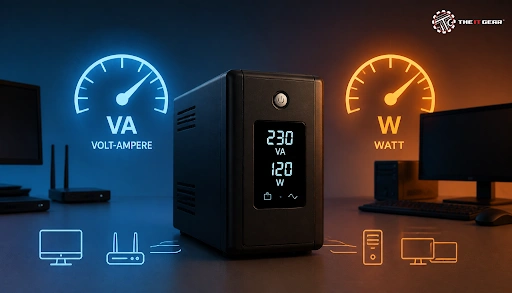
Two main power ratings are given for every kind of UPS that show the size of the battery and power inverter used, VA (Volt-Amps) and Watts. VA is a unit representing total electric power drawn from the AC network, which includes the part (reactive power) that is not doing any actual work.
Simply put, it is volts multiplied by amps (V × A) in electrical engineering lingo - that is also called 'the apparent power'. Because of this, in layman's terms, VA means the highest load that the UPS's internal components can support before becoming overworked.
As to the power expressed in watts, it refers to the real electrical power that gets consumed by the devices plugged into the UPS for which it was designed in the first place. There are various factors which relate the VA to watt such as the power factor ranging from 0.6 to 0.9 for most household gadgets and office appliances. A 1000VA UPS operating at a PF of around 0.6 would only generate about 600 watts on its output.
It is very common for Indian buyers to get confused between VA (Volt-Amperes) and Watts (W). While both are essential electrical ratings, they measure two completely different aspects of power capacity. It means before making a purchase you have to look at both of them very carefully.
Apparent power (VA) determines how much current the UPS inverter can supply. Exceeding the VA rating causes overheating and can damage the inverter circuitry.
True power (Watts) determines how much actual work your devices can do. An overload condition where the UPS cannot support the required current causes the alarm and the UPS automatically disconnects itself from the load to save the load.
The power factor makes the link between the former and the latter. Simply explained, the more power factor a UPS is equipped with, such as a 0.9 PF, the higher the actual power output (in Watts) it would produce under the same VA rating compared to a device with 0.6 power factor.
This way, if we take a 1000VA UPS rated at 600W and a 1000VA UPS rated at 900W have the same VA rating but very different real-world capacities. In fact, the second one could be doing much more than twice the first one when it comes to the tasks you want it for. When evaluating UPS VA rating vs watts, the watts value deserves all the attention since it is a true measurement of the ability to operate the devices that are at your disposal.
Determining the UPS requirement at the equipment level is much easier than it sounds:
1. Make a list of all the devices you wish to protect. Besides the CPU on your desktop, include your monitor, Wi-Fi router, external storage devices, and peripherals. Find out the wattage rating of each through the power adapter or nameplate of the device.
2. Calculate the total wattage required. Add the wattages of all the devices and that sum will be your total load. In case only amps are stated, multiply it with the supply voltage (230V is the standard in India) for obtaining VA and then multiply with 0.8 to arrive at the estimate of watts.
3. Add 20–30% safety margin. Multiply your total load with 1.2 to 1.3. This extra headroom will allow the UPS not to be overloaded, also accommodates future additions, and handles startup currents drawn by monitors and printers.
4. Convert to VA. Divide your required wattage by the UPS power factor (0.6 for economy models, 0.8 to 0.9 for premium units) to arrive at the minimum VA rating.
Suppose, if your total device load is 400W, add a 25% buffer to get 500W. Dividing by a 0.8 power factor gives you 625VA, so round up to a 700VA or 800VA UPS. This is exactly what any online UPS VA calculator does.
These two power ratings are generally found on UPS boxes in India and let us decode them for you.
Generally, the 600 VA unit gives around 300 to 360 watts true power at 0.6 power factor. That is enough for a single desktop computer with a monitor, or a router, modem, and a few small devices. If you power up a load which is higher than this value, it will alarm and shut down the UPS.
It is a 1000VA UPS that most Indian home buyers end up buying as their power requirement. Typically, it is designed to supply 600 watts of power to the load connected. That means such an arrangement will be quite enough for a desk computer with a screen as well as a gaming system or even a single home mini server. On a slightly better 1000VA UPS with the 0.9 power factor, you would actually get up to 900 watts of the power, as most units of 1000VA have an internal 12V 7Ah or 9Ah battery.
The backup period of a 1000VA UPS depends largely on what type of electronic load is being powered by it. For example, at full capacity (600W), the UPS will be able to provide backup power of 5 to 8 minutes - just enough for you to secure what you are working on and for the computer to be shut down properly before the power fails completely. If instead a 300W load is being powered by the same 1000VA UPS, the time that the battery can power up the load increases to 12 to 20 minutes approximately.
If you are only running networking equipment like a router and switch at around 150W, the same UPS can last 30 to 60 minutes. The other factors like battery's Ah capacity, battery age, and UPS efficiency also have an impact on backup time. When it comes to backup time, and if you need several hours of uninterrupted power, consider a higher-rated UPS or invest in an external battery pack.
For a standard Indian home setup with a desktop PC, LED monitor, and Wi-Fi router, a 600VA to 1000VA UPS is usually plenty. However, if you are powering a high-end gaming PC, a home NAS, or a small home-lab server, step up to a 1500VA or 2000VA unit. If you deal with frequent voltage fluctuations in your area, prioritize a UPS equipped with Automatic Voltage Regulation (AVR) and pure sine wave output.
Finally, local battery replacement availability and after-sales support are crucial in India, so always verify the brand's authorized service network in your city before making a purchase. At The IT Gear, you will find a selection of UPS systems across sizes and types to suit every budget.

You have to just check off on these items before making the actual purchase:
Once you know the relationship between VA and watts, it's quite simple to determine the right UPS rating. If you precisely figure out the total power consumption of the devices, you will avoid the frustration of an undersized UPS failing during a power cut. The IT Gear offers a wide selection of UPS systems and power protection gear across leading brands, all available online with reliable delivery across India.
Can I use a UPS rated lower than my total device wattage?
No. If you connect a load that exceeds the UPS watt rating causes overload alarms, and during a power outage the UPS may shut down immediately instead of providing backup.
What is kVA rating in UPS systems?
kVA (kilovolt-amperes) is simply equal to VA divided by 1000 and it is used for larger commercial and three-phase UPS systems. A 10kVA UPS, for example, is rated for 10,000 VA of apparent power.
How do I get 8 hours of UPS backup at home?
In case you'd like to use a higher load during backup, besides a bigger sized battery for the UPS you will also need external batteries, or a home inverter system with a larger battery bank (60–150Ah), depending on your load.
What is a UPS runtime calculator?
A UPS runtime calculator estimates backup time using the formula: (Battery Ah × Battery Voltage × Efficiency) ÷ Load in Watts. For example, a 9Ah 12V battery at 90% efficiency running a 100W load gives roughly 58 minutes of backup.
Is a higher VA rating always better?
Not necessarily. While a higher VA rating generally means higher capacity and longer potential runtime, it also comes with a higher price tag. You don't need to overspend on excess capacity you will never use. The most cost-effective approach is to match the rating to your actual load with adequate headroom for the best value.
The IT Gear has one of the largest portfolios of UPS systems and power protection gear from the most prominent manufacturer brands and is an online retailer that guarantees delivery throughout India.





#No. 9, 5th Floor, Max City Center, T. P Lane, Sadar Patrappa Road, Bengaluru - 560002 (Karnataka)