Select a category

An uninterruptible power supply is only as good as the battery within. Industry statistics indicate that for every 10°C increase in outside temperature, the life of a UPS battery can be reduced to nearly 50%. Due to this reason it becomes an essential point to focus on the maintenance of batteries that you work at home or part of a company. Good care and maintenance can mean the difference between a reliable or long-lasting UPS and an unreliable one.
This article explains in depth all the necessary points to be aware of in UPS maintenance, ranging from routine inspections to caring for batteries in the longer run.
UPS maintenance is the ongoing care, examination, and servicing of an uninterruptible power supply (UPS) to ensure it delivers uninterrupted operation.
UPS maintenance ensures the battery packs remain healthy, the UPS unit has adequate ventilation and is clean, all connections are secure, and old parts are replaced before they cause a failure.
The battery is the most susceptible element in any UPS, and much of a UPS' maintenance. If neglected, a UPS might fail precisely when needed the most, resulting in data loss, equipment damage, and expensive unplanned downtime. For businesses relying on critical infrastructure, investing in a reliable online UPS solution is equally important.
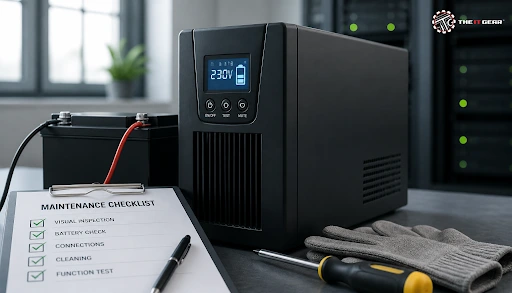
Preventive maintenance is the best way to keep your UPS reliable. Here's a handy checklist to help you keep your UPS running smoothly.
1. Visual Inspection of the Unit and Connections
Look for cracks, excessive dust, or signs of discolouration on the UPS. Examine all cables and battery connection points for signs of corrosion, loose connection, or fraying wires. Failure to address physical damage can result in short circuits and an electric shock.
2. Battery Voltage and Capacity Testing
With a multimeter, confirm that the voltage is within the range specified by the manufacturer. Conduct a runtime test by disconnecting the mains supply and notice how long the UPS supplies the connected load. If the runtime is greatly reduced, then the battery is already nearing the end of its service life.
3. Environmental and Cleanliness Checks
The UPS should be placed in a cool, dry, clean, dustless environment with proper air circulation. Regularly vacuum or wipe the vents to prevent dust accumulation that might block cooling fans. Keep the environment clear of rodents, water spills, and any flammable objects.
4. Load Verification
Check the total wattages of the connected gears, ensuring it doesn't exceed the UPS rated capacity. Consistently operating a UPS near the maximum load can cause premature wearing of the battery. Allow a safe margin of at least 20–30% for optimal performance.
5. Firmware and Monitoring Software Updates
If your UPS has communications, get the latest firmware version from the manufacturer. It can even notify you of battery health problems before they become serious.
The most effective method to prolong your UPS's lifespan always comes down to battery maintenance. The most common batteries used in UPS units will typically be sealed lead-acid, but there are others like nickel-cadmium too. It's fairly normal for these batteries to degrade over time, but keeping it properly maintained can extend the longevity and efficiency of a UPS.
The optimum operating temperature should be 20–25°C. If the temperature is higher, then the chemical reactions inside the battery process speed up. When storing a spare UPS or battery, it should be recharged every 3 to 6 months to prevent self-discharge.
Do not leave batteries dormant for long periods of time and cycle stored standby equipment by discharging and charging the UPS again. Batteries that fall foul of a battery self-test should be replaced well before their service life.
For most users, a preventive maintenance schedule of every 3-6 months is recommended. This includes inspecting battery terminals, cleaning vents, and testing battery voltage. In hot or dusty environments, increase the frequency to every 2-3 months. A full runtime and load test should be performed at least once or twice a year.
For businesses running critical IT infrastructure, an annual professional inspection by an authorised electrician is advisable. Following a consistent schedule ensures small issues are caught early, preventing sudden UPS failure during power cuts.
The UPS unit itself is generally good for 5 to 10 years, but the internal battery typically needs replacement every 3 to 5 years. The lifetime of the batteries is dependent on temperature, load, and maintenance. A UPS unit in a warm, poorly ventilated environment may require the batteries to be replaced every 2 years.
Conversely, a well-maintained UPS unit in a cool environment may have a battery lifetime stretching to 5 years. It is recommended to plan for the batteries to be replaced when they reach 5 years.
Yes, most UPS units are meant to be left plugged in all the time. By leaving it plugged in, the UPS keeps the battery fully charged and ready for use if a power outage occurs. The UPS uses a floating charge to prevent over-charging of the batteries. It is safe to leave the system plugged in on float charge in a well-ventilated area. Every three to six months, run a battery self-test.
If you do not intend to use the UPS for several months, switch it off and recharge the batteries every 3 to 6 months to prevent degradation.
A 1500VA UPS does not have a fixed backup time, but rather its backup time varies based on the load it offers power to. For a light load such as a single desktop computer drawing 150 to 200 watts, a 1500VA UPS can provide roughly 20 to 40 minutes of backup.
Under a near-maximum load (approximately 900 watts), the backup time drops to a couple of minutes at most. Battery capacity, age, inverter efficiency, and inverter type will impact this number. To estimate backup time accurately, find the sum of the wattage of all devices connected in wattage, not the VA rating.
UPS maintenance mainly consists of five vital parts: visual checks, battery testing, environmental adjustments, load management, and planned changes. You should check your UPS visually for dust, oxidation, and loose connections every couple of months. At regular intervals, you should measure battery voltage and runtime to get a picture of battery degradation.
The UPS unit should always be kept in an area that is dark and cool. It must be far away from heat-generating appliances, dusty rooms, and direct sunlight. Do not overload the machine so that it exceeds its rated capacity. Replace batteries at the end of their life span, usually every 3 to 5 years. Carrying out this sequence of actions will maximize the lifespan and reliability of the UPS device.

This section lists the most critical UPS maintenance steps for the convenience of busy readers.
Besides the UPS being properly kept, an excellent UPS is one that serves long. It is by spending only a few minutes cleaning every couple of months which can prolong the lifetime of the equipment as well as it will have continuous power supply whenever needed at critical times.
The IT Gear stocks a wide variety of brands including UPS systems, batteries, and accessories to match every home and office need. To find the ideal UPS for your requirements, have a look at our collection of products. In case the battery power gets cut off, we are here for backup support and will help you get the products as soon as possible. For those seeking reliable power protection, explore our range of offline UPS options designed for everyday use.
Should I Turn Off My UPS When Not in Use?
If you're going out of town for quite some time or you've turned off the devices and there isn't any load, it's totally fine to unplug the UPS. Still, for ordinary purposes, keeping the device turned on is a good practice so that the battery remains charged. Just remember to give your stored or spare battery a full charge every 3 to 6 months.
How Long Can a UPS Last Without Power?
It is entirely dependent on load and the size of the battery that the unit can run only in case of power outage for a certain amount of time. The battery with the capacity for a larger load is supposed to deliver the backup only for a few minutes whereas it is quite opposite for the ones that are lightly loaded as their runtime could range from 20–40 minutes. Well, by maintaining the battery on a regular basis, the UPS unit should work efficiently till the end of its service life.
How Long Does a UPS Battery Backup Last?
The battery of a UPS system usually gives backup power for about three to five years before its replacement becomes necessary although of course, the length of the battery life depends on ambient conditions - mainly temperature, frequency of operation, and how you service it.
When a UPS system is in a hot place, the battery life could be as low as two years, so it's best to place your UPS in a cooler and air-conditioned place.
Is UPS Preventive Maintenance Worth the Effort?
Yes! The cost and hassle of replacing batteries and equipment damaged by power outages are way more than the expenses of preventive maintenance. Small problems related to rusting contacts and dust accumulation and a battery slowly but steadily losing capacity are the kinds of issues that regular inspections and maintenance can catch well before such failures turn out to be extremely costly.
To have a healthy and reliable UPS, it is necessary that besides making a regular preventive maintenance you also carry out corrective maintenance in case a failure occurs. Spending a few minutes a couple of months apart for cleaning, checking your equipment, and changing parts when needed will extend the period of your UPS service and you could probably use the same unit several more times.





#No. 9, 5th Floor, Max City Center, T. P Lane, Sadar Patrappa Road, Bengaluru - 560002 (Karnataka)