








Select a category

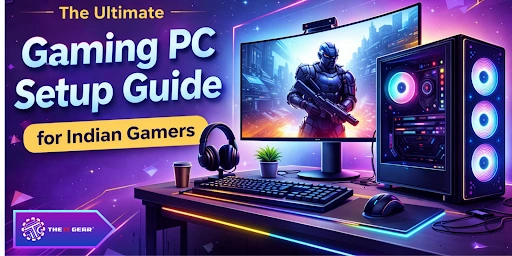
Setting up a gaming pc setup goes way beyond just investing in expensive parts. It's about designing a setting that brings out the best in your performance, comfort, and immersion. It doesn't matter if you are a casual gamer from Mumbai or a professional esports player from Delhi; the right gear can drastically change your game.
Given how fast the Indian gaming scene is developing, it's vital to get to know what a quality, well-rounded gaming rig is all about. This article will not only focus on the components of the hardware but also on the décor of the room that the gaming pc setup will be used in. Naturally, the information is Indian market-oriented.
The term gaming pc setup covers all the necessary equipment and peripherals to run games on the computer seamlessly, along with their spatial location in a gaming-specific zone. It is not a typical computer for office work, as only a gaming rig is capable of operating at a high frame rate, with sharp visuals, and providing controls that are very responsive.
The main elements that go into the gaming tower are the CPU, GPU, RAM, storage, motherboard, and power supply. After this basic set-up, the addition of a monitor, a gaming keyboard and mouse, headphones, or speakers, and sometimes a controller or a steering wheel might also be included.
According to an official Intel guide, 8 main categories are a must for gaming pc setups: The GPU is the one to top the list because it takes the lead in rendering work. If you don't have a dedicated graphics card, then even the pictures will freeze in modern games like Cyberpunk 2077 or Valorant. Indian gamers who want to save money are best served by a combo that balances a mid-range CPU like Intel i5 with a low-end GPU such as the NVIDIA RTX 5050.
The question about the cost of a full gaming pc setup is the most frequently asked among Indian gamers. A good set-up worldwide costs $1,000-$4,000. If converted into Indian rupees (approx. ₹85K to ₹3.4 lakhs), the sweet spot for most players lies between ₹85,000 and ₹212500. Besides, Indian prices include GST and import duties, which makes the components a bit more expensive than the U.S. prices.
According to the discussions of the Indian Gaming group on the Reddit platform, a "powerful" build that will be available in 2025 is starting at ₹70,000 for the tower alone, while a 1080p monitor, keyboard, and mouse will cost an additional ₹15,000–₹25,000.
For those who are ultra-budget seeking, a Gaming PC under 10000 or under 20000 will most likely be achieved with refurbished desktops or second-hand parts. A more practical entry point is ₹50,000 for a full set (tower + basic peripherals) using an APU like AMD Ryzen 5600G, which can handle esports titles like Free Fire or Valorant at low settings. Always allocate at least 40% of your budget to the GPU for the best gaming performance.
No gaming pc setup should have all-powerful hardware pieces. The CPU, GPU, and storage you chose should be the ones to fit your preferred games and performance targets. In the table below are the summarized recommended tiers based on the gaming types.
|
Gaming Style |
Recommended CPU | Storage | Typical Indian Budget (Tower Only) |
| Casual (Minecraft, League of Legends) | Intel i3 / Ryzen 3 | 500GB SSD | ₹35,000 – ₹50,000 |
| Mainstream 1080p (GTA V, Apex Legends) | Intel i5 / Ryzen 5 | 1TB SSD | ₹55,000 – ₹80,000 |
| Competitive / 1440p (Valorant, CS2) | Intel i7 / Ryzen 7 | 1TB SSD | ₹85,000 – ₹1,20,000 |
| 4K Ultra / Streaming (AAA titles) | Intel i9 / Ryzen 9 | 1TB SSD + 1TB HDD | ₹1,30,000+ |
For Free Fire players transitioning to PC via emulators like Gameloop, a mainstream 1080p setup is more than enough. The big thing that matters here is aligning your monitor's refresh rate with your GPU's output. A 144Hz display requires a stronger graphics card than a regular 60Hz monitor.
A fantastic gaming PC setup should have the tower as its focus and extend all the way into the room. Gaming room setup and Gaming setup background highlight the importance of spatial arrangement and visual aesthetics. Indian homes generally do not have large amounts of space. However, with clever design, even a tiny bedroom can be turned into an immersive gaming den.
Space-Saving Ideas for Small Rooms
Utilizing the vertical dimensions - hang your monitor on a wall arm, put floating shelves for your controllers and game boxes, and opt for a small desk (depth of 60cm or less). Small room gaming setups will also profit from under-desk cable trays and a CPU stand that can be rolled around, so that the tower is kept off the floor. A 45cm x 90cm corner desk is an example that can smoothly accommodate a 24-inch monitor, a keyboard, and a mouse, along with a medium-sized mousepad.
Lighting and Background Tips for Immersion
The gaming setup background is what you see behind your monitor. Just a blank wall is pretty dull, but RGB LED strips, Nanoleaf panels, or even a single poster can bring a bit of life. Bias lighting (putting LEDs behind the monitor) assists in reducing eye fatigue during long play times, and it makes colors more vibrant.
For Indian gamers with a tight budget, a 1,000 to 2,000 rupee roll of USB-powered RGB strip from Amazon or the local electronics market will be really useful. Place the strips along the back edge of your desk and behind your monitor for optimum impact.
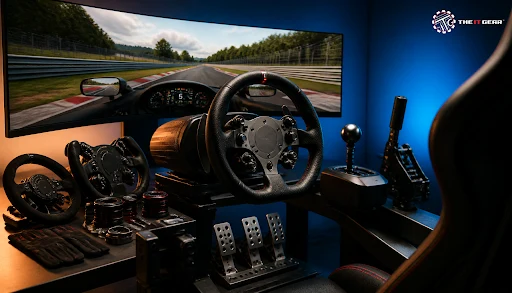
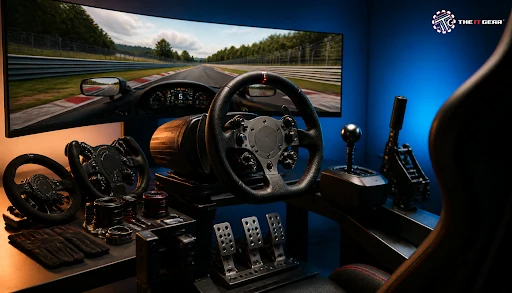
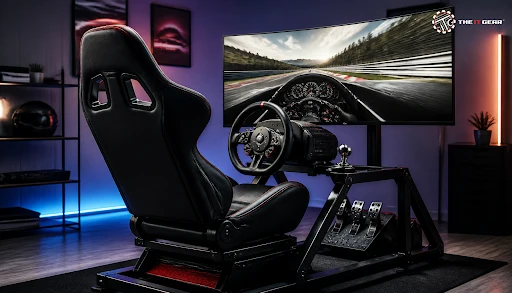
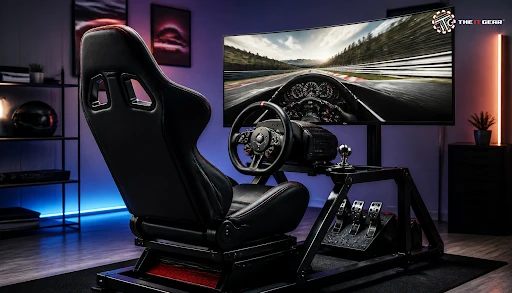
For those car racing enthusiasts, a gaming steering wheel setup without any doubt enhances the gaming experience to a whole new level. In contrast to a regular game pad, a force-feedback wheel (e.g., Logitech G29 or Thrustmaster T150) will provide you with a very realistic feeling in terms of resistance, pedals, and vibration, which will make your driving simulators like Assetto Corsa or F1 2024 extremely enjoyable.
When equipping it as part of your existing gaming pc setup, a strong desk clamp or dedicated wheel stand (approx. ₹5,000–₹15,000) will be necessary. Make sure your desk has at least 5cm of edge overhang for the clamp. Also, verify that your power supply can handle the wheel's USB and power draw. Most wheels have a separate power adapter.
Some other peripherals that you could consider are a mechanical keyboard (Cherry MX or clone switches), a lightweight mouse with adjustable DPI, and a large cloth mousepad. To buy these, you may be able to get all three for under ₹5,000–₹10,000, but with the result of considerable improvement in your level of control and comfort.
One of the biggest hurdles in putting together your gaming PC setup in India is finding genuine parts at reasonable prices. The IT Gear makes it simple by presenting a handpicked range of authentic CPUs, GPUs, motherboards, and peripherals from the most reliable brands such as Intel, NVIDIA, Corsair, and Logitech.
In comparison to the generic online shopping websites where fake parts are a common occurrence,The IT Gear authenticates every product and offers local warranty support as well. Their staff can also consult on custom builds. Just give them your budget and favorite games, and they will provide you with a well-balanced configuration. Whether you look for a free Fire rig budget ₹50,000 or a very high-end 4K streaming high-end rig, The IT Gear delivers them all over India with reliable shipping and after-sales service.
Before locking in your gaming PC setup, check off the boxes below to be sure you got everything covered:
Core components – CPU, GPU, motherboard, RAM, storage, PSU, cooling, case.
Peripherals – Monitor (refresh rate matching GPU), keyboard, mouse, headset or speakers.
Desk and chair – Sturdy surface, ergonomic support for long hours.
Cable management – Zip ties, cable sleeves, under-desk trays.
Lighting and background – Bias lighting, RGB strips, wall decor.
Budget allocation – Spend most on GPU, then CPU, and PSU.
Indian pricing check – Compare on The IT Gear, MDComputers, and Vedant Computers for the best deals.
Perfecting your gaming pc setup is a blend of maximising performance, sticking to your budget, and expressing your style. Selecting appropriate CPU-GPU pairs and organising your gaming room setup to be clutter-free are just some of the examples of how every small decision counts towards your immersion in the game and your gaming skills.
Indian gamers encounter some unique challenges like limited space and high component prices, but with clever strategies and reliable partners such as The IT Gear, you can end up with a rig that will be on par with the best in other countries. Begin with a definite budget, give preference to your favourite game genres, and upgrade your peripherals like a gaming steering wheel setup or RGB lighting gradually. Enjoy your games!
Q1: Can I build a gaming pc setup under ₹50,000 in India?
Most certainly, a setup of ₹50,000 full setup: tower + monitor + keyboard + mouse) It is doable for esports titles like Valorant, Free Fire (through emulator), and CS2 at 720p or low 1080p settings levels. Employ an AMD Ryzen 5600G APU (without a discrete GPU), 8GB RAM, a 256GB SSD, and a simple 60Hz monitor. For gaming, budget to at least ₹70,000.
Q2: What is the ideal monitor size for a small room gaming setup?
For desks with a depth of under 60cm, a 24-inch 1080p monitor is perfect. If you have ample space (75cm+), 27-inch 1440p is a good option. Stay away from 32-inch monitors in small rooms because they cause neck strain and visually overpower the desk.
Q3: Do I need a gaming steering wheel setup for racing games?
It is not a must, but a very good idea for simulation titles like iRacing or F1. A force-feedback wheel will make you more consistent and immersive. In the case of arcade racers such as Need for Speed, a normal controller will do.
Q4: How do I manage cables in a gamin0.g setup on a budget?
Get reusable zip ties (₹200 for 100 pieces), adhesive cable clips (₹300), and keep the wires along the desk legs. Put surplus cable length into a plastic box under the desk. Stay away from daisy-chaining power strips; go with a single surge protector.





#No. 9, 5th Floor, Max City Center, T. P Lane, Sadar Patrappa Road, Bengaluru - 560002 (Karnataka)