Select a category

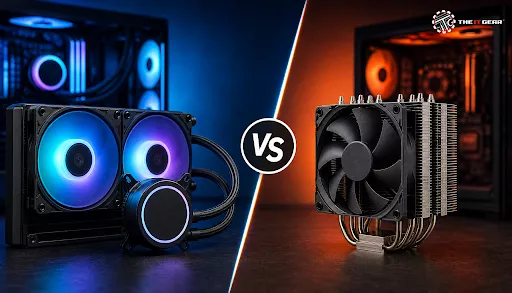
For so long, the PC enthusiast community has been engaged in an interesting showdown between AIO Coolers and Air Coolers, and rightly so! From what community discussions have shown, most regular game players don't care much for an advanced liquid cooling solution and are just happy with an air cooler that costs about ₹2,500 to ₹3,500. Yet the popularity of liquid cooling, most of all among gaming enthusiasts who use high-end PCs like the Intel Core i9-14900K and the AMD Ryzen 9 7950X that have maximum dissipation levels of around 250W, is steadily on an upward spiral.
So, choosing the right cooling option is vital. You may be building a game computer or a workstation, or just the regular one, but knowing the difference between a liquid AIO cooling solution and an air cooler will surely help you decide the best fit that is also economically feasible with a mind at ease.
The most basic difference is in how the two systems transport heat from the CPU to the outer parts in general. An air cooler has a heatsink, usually a metal block with fins made of aluminum / copper, coupled with one or more fans to throw away hot air from the component inside the computer enclosure. High-end PC parts like the Noctua NH-D15 and Deepcool Assassin III utilize double tower and multi heatpipe technology to maximize the contact area.
Still, the principle of an AIO cooler is completely different from an air cooler - the pump is mounted directly on the CPU to send the coolant through to the radiator where fans are located on the side to cool down the liquid. This basic distinction of a cooling system's physical construction results in quite different factors like performance level, noise output, and reliability between types of coolers.
AIO coolers make use of liquid as a heat conducting medium. The pump, which is a component of a heat sink mounted directly on the processor, drives a special coolant (usually distilled water with anti-corrosion agents and other additives) around a closed-loop path. There may also be a second liquid chamber connected to the first. The hot coolant moves to the radiator of different sizes (120mm, 240mm, 280mm, or 360mm) which have metal fins, fans then drive air and expel heat from the coolant using the fins.
Once cooled, the coolant is returned to the pump for the cycle to be repeated. Because of this, by using the liquid as the medium for transferring heat, AIOs cool off the CPU much faster than most air coolers, mostly when there is continual heavy demand on the CPU. Also, since it is the radiator that is blowing out the hot air outside your case, the entire temperature regulation of your system will surely get better.
Unlike AIO liquid coolers, air coolers utilize a much simpler approach to cooling. A metal base plate makes direct contact with the IHS (Integrated Heat Spreader) of the CPU. A portion of the generated heat is then transferred to one of the multiple metal rods (typically 4 to 6) which is the next part of the heat dissipation system. The heat rods act like superconductors transferring the heat to the fin array made of copper or aluminum.
This is essentially the part where the airflow is directed so that the heat is carried away from the fins and out of the case. The biggest reason that an air cooler is effective comes from the characteristics of its design such as the number of heat pipes, fin density, fan quality, and total surface area. In fact, there are hardly any moving parts except the fan of an air cooler which makes them inherently simpler and less vulnerable to breakdowns.
Comparing cooling capabilities we have to be aware that all coolers have their own pros & cons with a significant difference between AIO coolers and air coolers. When you are using high-end CPUs and working on intensive tasks that your CPU has to sustain for long like video rendering or extreme overclocking, then premium 360mm AIO coolers will almost always beat even the very best air coolers for thermal output and performance benchmarks!
Yet, the performance difference between a 240mm AIO and the best air cooler is not so big, at least for casual users. In most gaming applications, which normally use CPU at lower or sporadic loads, the difference in CPU temperatures between a top-class air cooler and a similar AIO may be as low as 2-5°C, so it probably shouldn't make a difference.
120mm AIO vs Air Cooler: Which Is Better?
120mm AIO is generally considered as beginners' entry level into the field of liquid cooling, but these days mid-range air coolers are catching up pretty well and sometimes outperform them. On most occasions, you can easily get an air cooler that performs even better than a basic 120mm AIO one if you spend between ₹3,000 to ₹5,000.
Also, you get a lot of additional benefits such as low volume operation, reliability, and lack of the possibility of pump failure or liquid spilling. Yet, a drawback of a 120mm radiator is that because of its very small size it can't dissipate heat very efficiently which limits a 120mm AIO cooler's performance to CPUs in the low-end segment of market like Intel Core i5 or AMD Ryzen 5.
So, with the same budget you could opt for a high performance and quiet air cooler such as the Cooler Master Hyper 212 or Deepcool AK400 instead. You will not even lose to the level of cooling but besides being noise-friendly and reliable they do not present any threat of water leakage. Unless you have extremely tight space in a compact ITX build case where there is even no room for the air radiator, a 120mm AIO is the last thing you want when you compare it with an air cooler having similar price range.
360mm AIO vs Air Cooler: The High-End Showdown
However, a 360mm AIO cooler is perhaps the most effective CPU cooling solution available on the retail market today, with its three fans of 120mm size providing an excellent heat dissipation and cooling even the most power hungry CPUs under the extreme workloads like video rendering or extreme overclocking which generates high heat load!
The main drawback of AIO coolers like a 360mm one is that they can be pretty costly - usually from ₹12,000 to ₹20,000 - and you need a case with space for such a big radiator. Also, it brings in the risk factors with the pump noise and pump longevity, which are, after all, liquid cooling related.
If you plan to use every bit of your top-of-the-line CPU's capabilities, a 360mm AIO is still, by far, the best option. On one hand, it gives you the maximum cooling performance, on the other, it comes with more potential drawbacks. But most avid gamers would be better off with a premium air cooler such as Noctua's NH-D15, since it gives around 90% of the performance at half the cost of a top-end air cooler.
This is probably one of the very common questions in the PC building community, and the answer is very clear. Yes! Air coolers have a very uncomplicated structure with only one moving part, the fan, which is simple and can be replaced easily in case of failure. A good air cooler should be able to endure more than 10 or 15 years and will definitely outlive any CPU upgrade multiple times.
However, AIO coolers cannot survive for that long due to the fact that their components are very intricate. Apart from the pump being the first to break down, many AIOs have their fans or water block degraded and need to be replaced after 3 to 5 years only. And, the liquid inside the cooling loop escapes slowly through permeation so, the coolant's effectiveness and hence, the cooling, diminishes as time passes.
However, high-grade AIOs from well-known brands like Corsair, NZXT, and Arctic, may be a bit longer lasting, they are still quite likely to have sudden failures, like the pump stopping or in more serious cases, leaking liquid that can cause damage to other parts. This makes them more of a gamble than air coolers.
This really depends fully on both your CPU and the way you use it. A high-quality air cooler is more than adequate for your everyday computing activities and gaming, for mid-range chips, like the Intel Core i5-14600K or the AMD Ryzen 5 7600X. These types of CPUs have low thermal design power (TDP) of 65W to 125W and even a budget air cooler will handle them quite comfortably.
Top-tier air cooler or a 240mm AIO should be good enough for most high-end CPUs, like the Intel Core i7-14700K or AMD Ryzen 7 7800X3D. Only for extreme high-end flagship CPUs like the Intel Core i9-14900K or AMD Ryzen 9 7950X, mainly when you are overclocking or working with large workloads in fields like video editing or 3D rendering, does investing in a 360mm AIO really become something you would regret skipping.
So, if you're making a gaming PC equipped with a mid-range CPU, you should think twice before adding a fancy AIO since the money would be better spent on a faster GPU.
As a means to make the right decision without hesitation, here's a concise checklist as your use case.

The whole idea of which is better between an AIO cooler and air cooler isn't something that can be generalized. High performing air coolers have been around long before liquid coolers and for most computer builds in India, an air cooler is the go-to solution if you are to get a good mix of performance, reliability and cost saving.
It not only has much less noise and more durability than a matching AIO but it will save you a huge sum of money too. In fact, we recommend a high-quality air cooler to almost all of our readers if there is no requirement for aesthetics or customization in the build. Even so, if you decide to purchase a top-tier CPU with an ultra-competitive CPU or you're really into visuals and customization then it is completely valid to spend the extra money on a 240 or 360mm AIO.
If you are not quite sure which one to choose or want to compare different models of air and liquid cooling systems, don't hesitate to reach out to us at The IT Gear for assistance and guidance. Let's get started and check out our range of CPU coolers together to discover the optimal cooler that suits your upcoming PC build.
Which is better for cooling, an AIO or an air cooler?
Better cooling is offered by 360mm premium AIO coolers mainly for high-end CPUs with sustained workloads. Most gaming PCs can benefit from excellent performance and less noise from a premium air cooler. Whether a cooling solution will suit you ultimately is dictated by your choice of the CPU, work pattern and your financial budget.
Which type of cooler is best for PC?
The kind of cooling system that should be used is dictated by the requirements of the build. An air system will suit best for budget and mid-range builds because of the cost effectiveness and reliability of it. AIO coolers for PC are suggested for those who are into high-end gaming or have an overclocked workstation with a flagship CPU. The decision you are going to take also depends on the available space in your case, the total dissipated power of CPU (TDP) and your sound preference.
Are AIO coolers quieter than air coolers?
Hardly. AIO coolers are much louder than air coolers even as the radiator's fans spin fast to compensate for heat and noise that the pump also creates. But, top air coolers that use big fans which rotate at slow speed, are very low on noise emission. That said, both coolers usually operate at a very low noise level most of the time while they are not under load.
Can an air cooler handle an Intel Core i9-14900K?
Actually, a liquid cooling would of course cool very well, if you want, but an air cooler is definitely the cheapest and longest lasting option in a situation where you don't need to show off your build visually, for example a gaming build. Models like the Noctua NH-D15 and Deepcool Assassin IV air coolers are considered top-tier and have sufficient efficiency to cool an i9-14900K when you just want to play your games or for general PC usage.
Still, if your workload will be continuously all-core, like the one in rendering and video editing run, it is better to rely on a 360mm AIO unit which gives better thermal management and prevents the overheating of the processor.
What is the lifespan of an AIO cooler?
Largely, AIO coolers have a life expectancy of about 3 to 6 years as the pump gets worn or starts leaking when liquid inside gets vaporized. In fact, models coming from top-notch companies like Corsair and Arctic, can offer even more years of usage if not more. Conversely, it is very easy for air coolers to survive for 10-15 years only with replacing their fans occasionally.
Do I need to maintain an AIO cooler?
There are no parts on an AIO you have to regularly clean or service as it is a closed-loop system. But over time you should dust-clean the fans, radiator to ensure the free and smooth airflow is being maintained between the cooler and the room. Should you notice that the pump is no longer performing and you can't get it to work, or the device becomes a lot less effective for some other reason, the whole cooler would have to be replaced in any case.
Is a 120mm AIO better than a stock cooler?
A 120mm AIO is better than the stock coolers provided with i9 CPUs or by AMD in cooling power and noise level control. It has been widely accepted that a well-priced and high-efficiency air cooler would perform much better than a 120mm AIO which makes it very rare to be used by the builders in small computers which have been limited by space.
Which AIO size is best for gaming?
In most game rigs, the 240mm AIO is the perfect choice with an ideal balance among performance, compatibility, and price. It is enough to cool an average-level or a high-level CPU and the 240mm radiator fits most mid-tower chassis. A 360mm radiator is just a requirement when you get one of the top CPUs or when you go for extreme overclocking.





#No. 9, 5th Floor, Max City Center, T. P Lane, Sadar Patrappa Road, Bengaluru - 560002 (Karnataka)