Main Image

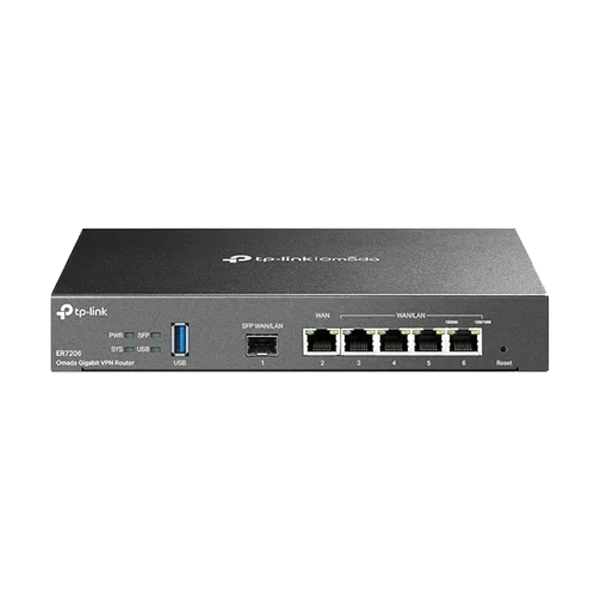
TP-Link Omada ER7206 Multi-WAN Professional Gigabit VPN Router

₹ 25,999 ~ ₹ 12,599 52 OFF
Save GST upto18% on Business purchase
COD Available* | EMI Options Available

Quantity:
(2 available)

Shop with confidence

🔒 Secure & Safe Payments
100% Genuine Products
🎧 Trusted Customer Support
🚚 Reliable Delivery

TP-Link Omada ER7206 Multi-WAN Professional Gigabit VPN Router


FEATURES

  • The TP-Link Omada ER7206 is a professional Multi-WAN Gigabit VPN router designed to provide secure, reliable, and high-performance networking for small and medium-sized businesses. It combines advanced routing features, strong security protection, and easy network management to support modern business connectivity needs.
  • The ER7206 comes with Gigabit Ethernet ports that deliver fast wired network performance for offices, branch locations, and professional environments. It supports multiple WAN connections, allowing businesses to use different internet providers for load balancing and failover protection. This helps maintain stable internet access and reduces downtime in case one connection experiences issues.
  • With advanced VPN capabilities, the router enables secure communication between different locations and remote users. It supports various VPN technologies, allowing employees to safely access company resources from outside the office while keeping business data protected.
  • Integrated with the TP-Link Omada SDN platform, the ER7206 provides centralized cloud-based management. Network administrators can easily monitor, configure, and manage multiple network devices from a single interface. This simplifies network maintenance and allows businesses to efficiently manage their entire infrastructure.
  • The router includes powerful security features such as firewall protection, access control, IP-MAC binding, DoS defense, and advanced traffic management. These features help protect the network from unauthorized access and improve overall security.
  • The professional load balancing function intelligently distributes network traffic across multiple internet connections, ensuring better bandwidth usage and improved user experience. Quality of Service (QoS) features allow administrators to prioritize important applications such as video conferencing, cloud services, and business software.
  • The compact and reliable design of the TP-Link Omada ER7206 makes it suitable for offices, retail stores, hotels, educational institutions, and branch networks. With its combination of Gigabit performance, secure VPN connectivity, centralized management, and enterprise-level features, the ER7206 is an excellent solution for businesses looking for a dependable and scalable networking solution.


SPECIFICATIONS


Brand

TP-Link

Model

ER7206

Color

Black

Access Control

Source


Destination IP Based Access Control

Standards and Protocols

IEEE 802.3, IEEE802.3u, IEEE802.3ab, IEEE 802.3z, IEEE 802.3x, IEEE 802.1q


TCP/IP, DHCP, ICMP, NAT, PPPoE, NTP, HTTP, HTTPS, DNS, IPSec, PPTP, L2TP, OpenVPN, SNMP

Interface

1 Fixed Gigabit SFP WAN Port


1 Fixed Gigabit RJ45 WAN Port


2 Fixed Gigabit RJ45 LAN Ports


2 Changeable Gigabit RJ45 WAN/LAN Ports

Network Media

10BASE-T: UTP category 3, 4, 5 cable (Max 100m)


EIA/TIA-568 100Ω STP (Max 100m)


100BASE-TX: UTP category 5, 5e cable (Max 100m)


EIA/TIA-568 100Ω STP (Max 100m)


1000BASE-T: UTP category 5, 5e, 6 cable (Max 100m)

Button

Reset Button

Power Supply

100–240 V~50/60 Hz

Flash

SPI 4MB + NAND 128MB

DRAM

512MB

Mounting

Desktop

Max. Power Consumption

8.95W

System Requirements

Microsoft Windows 98SE, NT, 2000, XP, Vista™ or Windows 7/8/8.1/10/11, MAC OS, NetWare, UNIX or Linux

Dimensions

226 × 131 × 35 mm

Package Content

ER7206


Power Cord


Quick Installation Guide

Warranty

3 Year Brand Warranty

Note

*Features, Price and specifications are subject to change without notice.

One Click to Visit Our Social Media Handle →Instagram

Please login to submit a review.

No reviews yet.

Google
★★★★★
4.8 out of 5
Cart

Your cart is currently empty

Continue shopping
×
Need Assistance?