Grandstream GXP2200 EXT Expansion Module IP Phone

No reviews yet |Write a review
SKU: GXP2200 EXT  |  Brand: Grandstream
₹ 12,299 ₹ 20,267 39% OFF ● Out of Stock
Save GST upto 18% on Business purchase
Check delivery
Enter pincode to see delivery date, COD availability and shipping charges.

Secure Payments
100% Genuine
Fast Delivery
Expert Support

Grandstream GXP2200 EXT Expansion Module IP Phone


FEATURE

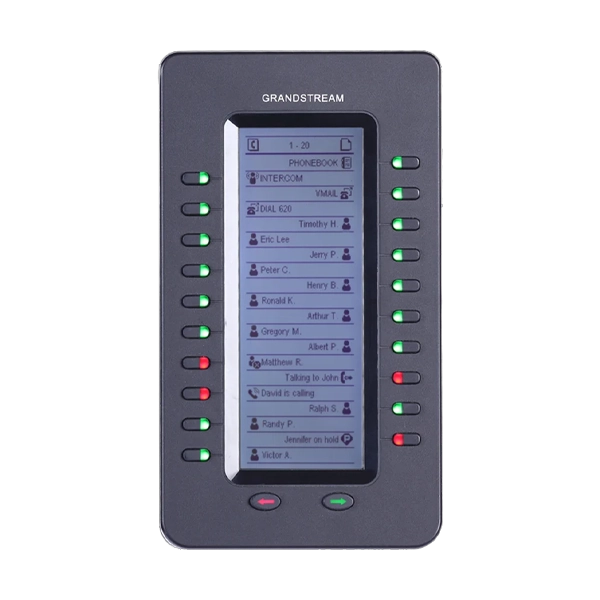
  • The Grandstream GXP2200EXT is an IP phone expansion module designed to make call management easier for busy business users. It is an ideal accessory for receptionists, managers, sales teams, customer service staff, and other professionals who regularly handle multiple calls, extensions, or contacts.
  • The GXP2200EXT adds extra programmable keys to compatible Grandstream IP phones, giving users quick access to frequently used numbers, extensions, and Busy Lamp Field (BLF) functions. Instead of searching through menus or manually dialing numbers, users can use the dedicated keys to quickly reach colleagues, departments, customers, or other important contacts.
  • The expansion module features a 128 × 384 graphic LCD display and 20 programmable quick-dial/BLF keys. Each key includes a dual-color LED indicator, allowing users to easily check the status of monitored extensions. This can be especially helpful for reception desks and busy offices where knowing whether a colleague is available or already on a call is important.
  • The GXP2200EXT is designed to work with compatible Grandstream IP phones and can be connected to create a more efficient call-handling setup. The module supports up to 20 quick-dial or BLF keys per unit, helping users organize commonly used contacts and extensions in a convenient way.
  • For larger business communication setups, the GXP2200EXT can be used in multiple units with compatible phones. The Grandstream GXP2170, for example, can support up to four GXP2200EXT modules, providing a large number of additional programmable keys for users who need extensive call-management capabilities.
  • The module has a professional and compact design that matches business environments. Its clear display and LED indicators make it easy to monitor extensions and access contacts at a glance. It is particularly useful for receptionists and operators who need to manage many calls throughout the day.
  • Whether you need faster access to frequently dialed numbers or want a better way to monitor office extensions, the Grandstream GXP2200EXT Expansion Module can help make everyday call handling more organized and efficient.

SPECIFICATION

Brand

Grandstream

Model

GXP2200 EXT

Color

Black

Product Type

Expansion Module

Display

128 x 384 Graphic LCD

Programmable Keys

20 per page

LED Indicators

Dual-color LEDs on each programmable key

Extension Capacity

Up to 40 extensions per module

Maximum Expansion

Up to 160 programmable buttons with 4 daisy-chained modules

Supported Features

BLF, Call Park/Pick-up, Speed Dial, Presence, Intercom, Conference, Transfer, Forward

Power Source

Powered by Host Phone

Firmware Upgrades

Delivered by Host Phone

Compatible Devices

Grandstream GXP2140, GXP2170, GXV3240

Dimensions

206 x 117 x 32 mm

Weight

0.38 kg

Warranty

1 Year

Note

*Features, Price and Specifications are subject to change without notice.

One Click to Visit Our Social Media Handle →Instagram 

Product specifications are displayed from the product information supplied by the catalog.

★★★★★
0 Reviews

Customer Reviews

Read customer feedback or submit your own review after selecting a rating.

Please login to submit a review.

No reviews yet.

DeliveryUse the pincode checker above to verify delivery availability and estimated delivery date.
ReturnsSee the current shipping and return policy for applicable terms.
PaymentAvailable payment methods and applicable options are shown during checkout.

The IT Gear lists genuine products from the brands and suppliers represented in its catalog.

Yes. Enter your pincode in the delivery checker in the purchase panel.

If your account and the product are eligible, use the Apply Coins control in the purchase panel.
Google
★★★★★
4.8 out of 5
Cart

Your cart is currently empty

Continue shopping
×
Need Assistance?